TL;DR: ChatGPT for business pays off in a small company when every workflow has a prompt, an owner and a person who checks the output before it reaches a customer. Below are 15 workflows from sales to product, each with a prompt to copy and the check a human still owns. For a team of two or more, pay for ChatGPT Business at €21 per seat a month billed annually (€26 monthly): it keeps business data out of model training by default and gives you an admin console. The free planner below shows your hours back, seat cost and the three workflows to start with.
ChatGPT for business looks the same in almost every small company I advise: everyone has an account and nobody has a system. Five people paste five versions of the same customer email into five private chats, two of them on free plans, and the founder has no idea which client data left the building.
I run lean, distributed teams, and I treat ChatGPT like a junior hire with a great memory and zero judgement. It drafts, sorts, summarises and calculates. It never signs, sends or decides. Below is the setup I would put into any company of 2 to 20 people this month.
Every price, policy and law here comes from official pages I opened on 29 October 2026: OpenAI, Eurostat and the European Commission. Hours saved are OUR estimates, clearly marked.
What does "ChatGPT for business" mean in 2026?
The phrase covers two things, and search results mix them up.
- The practice: people using ChatGPT, the assistant made by OpenAI, to draft, summarise, research and clean data at work. Any plan does this, the free one included.
- The product: ChatGPT Business, OpenAI's paid workspace for teams of 2 to 200 employees, with per-seat billing, an admin console, SAML single sign-on and connections to Google Workspace, Slack, GitHub and Microsoft 365.
You need the practice before the product: a paid workspace without prompts and rules gives you a bigger bill and the same chaos. The current models belong to the GPT-6 family; our news piece on GPT-6.1 Terra covers OpenAI's cheaper computer-use model.
How many hours can ChatGPT give back to a small team?
Here is my maths before paying for a single seat: hours saved per person per week, times people, times 4.33 weeks, times your loaded hourly cost (salary plus taxes, benefits and overhead, divided by paid hours), minus the monthly seat cost. The planner does it for you: tick your workflows, change our hour estimates, pick a plan. The defaults show a five-person team on Business seats. One new line for that maths: since 28 October, Pro and Business plans come with free monthly OpenAI API credits, $20 per paid Business Standard seat and $100 per Premium seat, capped at $500 per workspace.
Two rules keep the number honest. Our estimates are net of the human check: a draft that saves ten minutes and needs three of review counts as seven. And saved hours only count if they go somewhere, such as sales calls, shipping or sleep. Hours that vanish into longer meetings are worth zero. Our guide on checking whether an AI tool pays for itself has the full method.
How many companies already use AI at work?
Fewer than the hype suggests, which is your opening:
- 19.95% of EU enterprises with 10 or more people used AI in 2025, up 6.47 percentage points on 2024, according to Eurostat's Use of artificial intelligence in enterprises (data extracted December 2025).
- Only 17% of small enterprises used AI, against about 55% of large ones.
- AI users applied it most to marketing or sales (34.70%) and business administration (about 31%): the jobs in the list below.
- Companies that considered AI and passed blamed missing skills (70.89%), unclear legal consequences (52.52%) and privacy worries (48.83%).
- OpenAI's Business page claims over 5 million business users of ChatGPT Business.
Skills, legal clarity and privacy are three problems a small company fixes in a month with a prompt library, a one-page policy and the right plan.
Which 15 workflows should a small company run on ChatGPT?
These are the workflows I see paying back fastest in companies of 2 to 20 people. The matrix shows our estimate of hours saved per person per week, after the human check, plus the risk and the review each one needs.
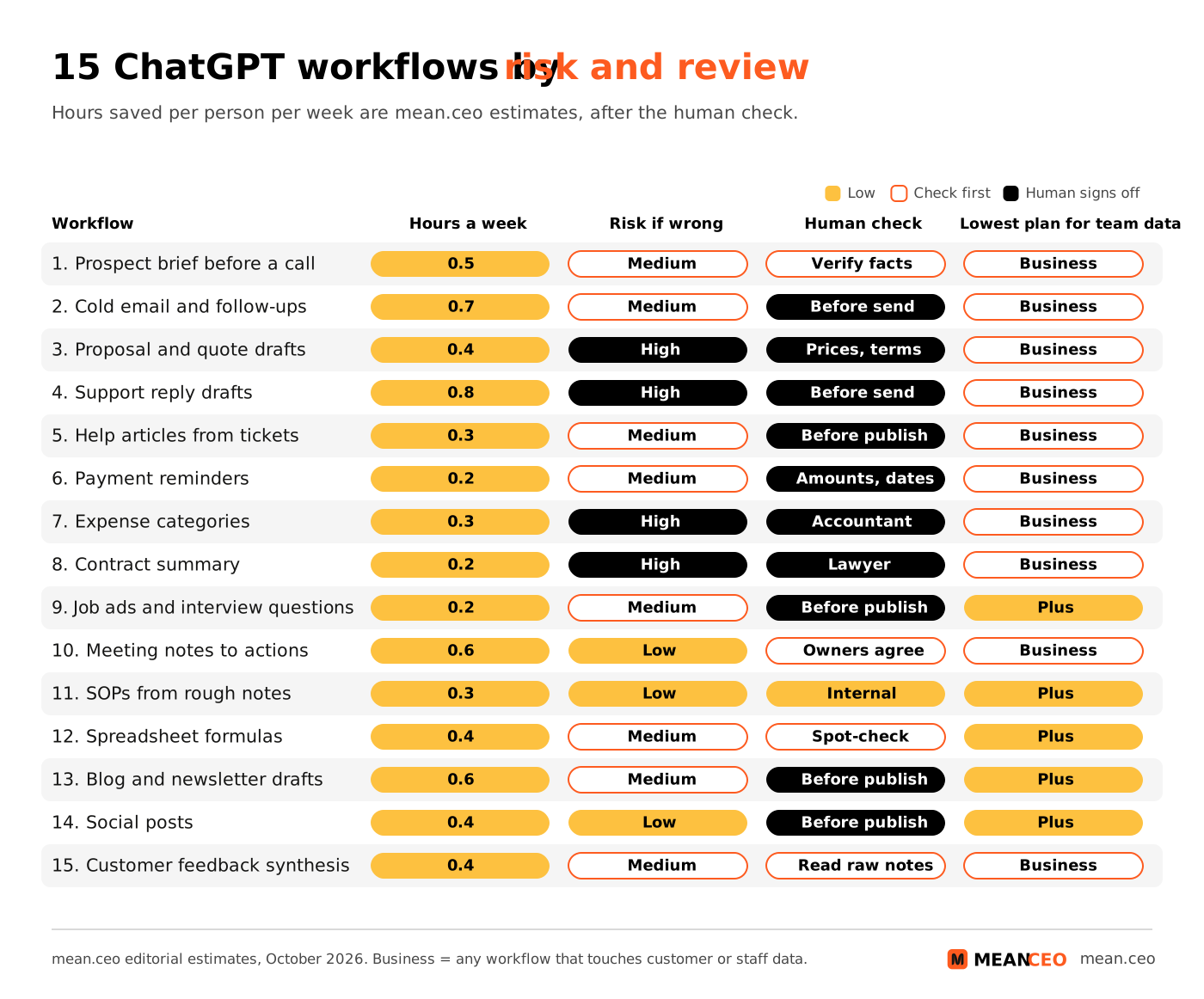
Replace the parts in square brackets and save every prompt that works in a shared project, so the whole team uses one version. Our practical framework for AI prompting explains why role, context, format and limits beat clever wording.
Sales: prospect briefs, outreach and proposals
1. Prospect brief before a call. Ten minutes of reading becomes a one-page brief. Human check: open every cited source, because invented funding rounds still slip through.
Prompt: Using web search, write a one-page brief on [COMPANY] before my call with [ROLE]: what they sell, news from the last 6 months with sources, 3 problems our [PRODUCT] solves for them, 3 questions to ask. Mark anything unconfirmed as UNCONFIRMED.
2. Cold email and follow-up drafts. ChatGPT writes, a human sends. Our sales outreach templates show the structure that gets replies.
Prompt: Write a cold email of at most 90 words to [ROLE] at [COMPANY]. Reason to write now: [TRIGGER]. Offer: [OFFER]. Proof: [RESULT]. Ask for a 15-minute call. Add two 50-word follow-ups for day 4 and day 10, each with one new fact. No flattery.
3. Proposal and quote first drafts. Call notes plus your price list become a structured proposal. A human checks every price and date, since a confident wrong number becomes a promise.
Prompt: Turn these call notes [PASTE, names removed] into a proposal: their problem in their words, our solution in 3 steps, timeline, price from this list only [PASTE], and what is NOT included. Flag requests my list does not cover.
Support: reply drafts and help articles
4. Support reply drafts. Paste the ticket and the help article, get a reply a human edits and sends. Our guide on using ChatGPT for customer support covers the full setup.
Prompt: Draft a reply to this message [PASTE, personal data removed] using ONLY this help article [PASTE]. If it does not answer the question, say what I should ask the customer. Under 120 words. Never promise refunds, discounts or dates.
5. Help articles from solved tickets. Each week, the three most repeated questions become articles, and the next reply drafts get better source material.
Prompt: From these 10 anonymised tickets about [TOPIC] [PASTE], write one help article: the customer's question as the title, a 2-sentence answer, numbered steps, then "If this did not work". Under 300 words.
Finance and admin: reminders, expenses and contracts
6. Payment reminders. Three reminders, friendly to firm, written once. Check amounts and dates against your accounting tool before each send. Our bookkeeping basics for founders cover the rest of the routine.
Prompt: Write three reminders for an unpaid invoice: day 3 (friendly), day 14 (clear, late fees per [TERMS]), day 30 (final notice before [NEXT STEP]). Placeholders for number, amount and due date. Under 80 words each.
7. Expense categories from a bank export. Strip account numbers, paste the CSV, get a category per line. Your accountant still signs off on local tax treatment.
Prompt: Categorise each line of this export [PASTE] into [CATEGORIES]. Return a table: date, description, amount, category, confidence (high, medium, low). List low-confidence lines separately with your question.
8. Contract summary before the lawyer. Term, notice, liability cap and auto-renewal in one table, so you arrive with sharp questions. The lawyer decides.
Prompt: Summarise this contract [PASTE, parties renamed A and B] in a table: term, renewal, notice, payment terms, liability cap, IP ownership, termination, unusual clauses, with clause numbers. Then list 5 questions for my lawyer.
Hiring: job ads and interview questions
9. Job ads and interview questions. A clear ad and a scored interview take minutes. People decisions stay human; see the "do not automate" section. Read when to hire your first employee before the ad.
Prompt: Write a job ad for a [ROLE] in a [SIZE]-person company that [WHAT WE DO]: what they own in the first 90 days, 5 must-have skills, salary range [RANGE], remote rules. Then 6 interview questions tied to the must-haves, each with what a strong answer contains.
Ops: meetings, SOPs and spreadsheets
10. Meeting notes to an action list. Decisions, owners and deadlines from a transcript. Check that every owner agreed.
Prompt: From these notes [PASTE], list decisions, actions as "owner, task, deadline", open questions and anything promised to a customer. Write MISSING where an owner or deadline is absent.
11. SOPs from rough notes. A standard operating procedure (SOP) is the written way your company does a repeated task. Record yourself doing it and paste the transcript. Our guide to SOPs your team will use covers where to keep them.
Prompt: Turn this transcript of me doing [TASK] [PASTE] into an SOP: purpose, tools, numbered one-action steps, common mistakes, and how to know it was done right. Write it for a new hire on day one.
12. Spreadsheet formulas and cleanup. Describe the result, get the formula. Spot-check five rows by hand every time.
Prompt: My sheet has columns [LIST]. Write a Google Sheets formula that [GOAL], explain it in one sentence and give 3 test rows with expected results.
Marketing: drafts and repurposing
13. Blog and newsletter first drafts. ChatGPT drafts from your outline and a brand voice document; a human adds stories, opinions and facts. See how to train AI on your brand voice.
Prompt: Using my voice guide [PASTE] and notes [PASTE], draft an article titled [TITLE] for [READER]. Short paragraphs, one example per section, no claim without a source from my notes. Write [ADD STORY] where a personal example belongs.
14. Social posts from one long piece. One article becomes five LinkedIn posts. Edit each, because five posts in one rhythm read like a machine. Our piece on ChatGPT traffic hiding in "direct" explains why AI referrals vanish from your reports.
Prompt: From this article [PASTE], write 5 LinkedIn posts, each on a different idea, under 120 words, opening with a fact or number. Vary the structure. No hashtags.
Product: feedback synthesis
15. Customer feedback synthesis. Anonymised interview notes and reviews become themes with counts and quotes. Read the raw notes behind your top theme before you build anything.
Prompt: Group these [NUMBER] anonymised comments [PASTE] into themes. For each: count, 2 short quotes, the job the customer is trying to get done, one product change it suggests. List comments that fit no theme.
Which ChatGPT plan should a small company pay for?
These are the prices on OpenAI's pricing page on 29 October 2026, shown in euro to a visitor in the Netherlands. The page does not say whether VAT is included, so check the total at checkout in your country.
My rules, in order:
- Solo founder: Plus at €23 a month, with OpenAI's training opt-out switched on.
- Two people or more: Business Standard, billed annually. At €21 a seat it costs less than Plus at €23 and adds admin control, a DPA and no training on your data by default. Five seats cost €105 a month.
- Premium seats only for the one or two people who live in ChatGPT all day. OpenAI offers dots, its always-on agents, on Premium "in eligible markets"; our piece on OpenAI's agents launching without Europe explains the catch for EU teams.
- Enterprise only when a client demands data stored in the EU. OpenAI's comparison table lists EU data residency for Enterprise only, together with SCIM provisioning, role-based access and IP allowlisting.
Tell your team on day one: in ChatGPT Business, workspace admins can view, access, export and delete members' conversations, according to OpenAI's enterprise privacy page. A work chat is no private diary.
Our Gemini vs ChatGPT comparison and our list of AI tools a small team actually pays for put ChatGPT Business next to Claude, Gemini and Copilot seats.
What should your team never paste into ChatGPT?
Two definitions first. The GDPR (General Data Protection Regulation, Regulation (EU) 2016/679) covers any information about an identifiable person. A DPA (Data Processing Agreement; OpenAI calls it a Data Processing Addendum) is the contract between your company and a supplier that processes personal data for you. GDPR Article 28 says you may use only processors "providing sufficient guarantees", under a contract.
OpenAI's enterprise privacy page offers a DPA for ChatGPT Business, ChatGPT Enterprise and the API, and names no individual plan. So my rule: customer personal data goes only into a Business or Enterprise workspace, after the DPA is signed. Our guide to Data Processing Agreements lists the clauses to read.
Even on Business, these NEVER go into a chat:
- Passwords, API keys and access tokens; see what happened in the Railway and LiteLLM breaches.
- Bank account numbers, card numbers and ID documents.
- Health data about customers or staff, plus salary files and performance reviews.
- Client material under NDA, unless the contract allows subprocessors.
- Full customer lists. Replace names with Client A and Client B before pasting.
Connect only the apps a workflow needs; admins choose which apps are on, and OpenAI says it does not train on data accessed from apps by default. Keep a person in every decision about a person, because GDPR Article 22 gives people the right not to face a decision "based solely on automated processing" with legal or similar effects. More in how European startups use AI without breaking GDPR.
What does the EU AI Act ask of a company that uses ChatGPT?
The EU AI Act is the European Union's law on artificial intelligence. One article lands on every company whose staff use ChatGPT: Article 4, AI literacy. According to the European Commission's AI literacy Q&A (updated 20 October 2026):
- Companies using AI must take measures to support the AI literacy of their staff and of contractors who use AI for them, since 2 February 2025.
- National market surveillance authorities enforce it from 2 August 2026.
- The Digital Omnibus on AI (Regulation (EU) 2026/1744) amended Article 4 in July 2026: the duty stays, and no "sufficient" level is mandated.
- No certificate is needed. An internal record of trainings is enough.
- Staff writing ad copy or translating with ChatGPT should know its risks, such as hallucination: confident output that is false.
My minimum: a 60-minute session, a one-page AI policy and a dated attendance list. One more date: AI for employment decisions, such as CV-sorting software, is a high-risk use case with rules applying from 2 December 2027, per the Commission's AI Act page.
What should a small company NOT automate with ChatGPT?
All of this is technically possible today. I keep a human hand on each one, because a wrong answer costs far more than the minutes saved.
- Ranking or rejecting job applicants. It touches GDPR Article 22, becomes AI Act high-risk territory in December 2027 and copies old bias into new hires.
- Anything with a price, discount, refund or deadline, sent unread. One invented discount costs more than a year of seats.
- Firing, warnings and performance reviews. People remember how they were told.
- Figures for tax returns, investor updates or bank applications. Check your logic with ChatGPT, take every number from the source system.
- Legal, medical or financial advice to clients under your name.
- Crisis apologies and messages to an angry client. People can tell.
- Strategy calls. ChatGPT is a sparring partner; the decision stays with you.
Our take on when NOT to use AI in your startup covers the trust side.
How do you roll out ChatGPT in a small team in 30 days?
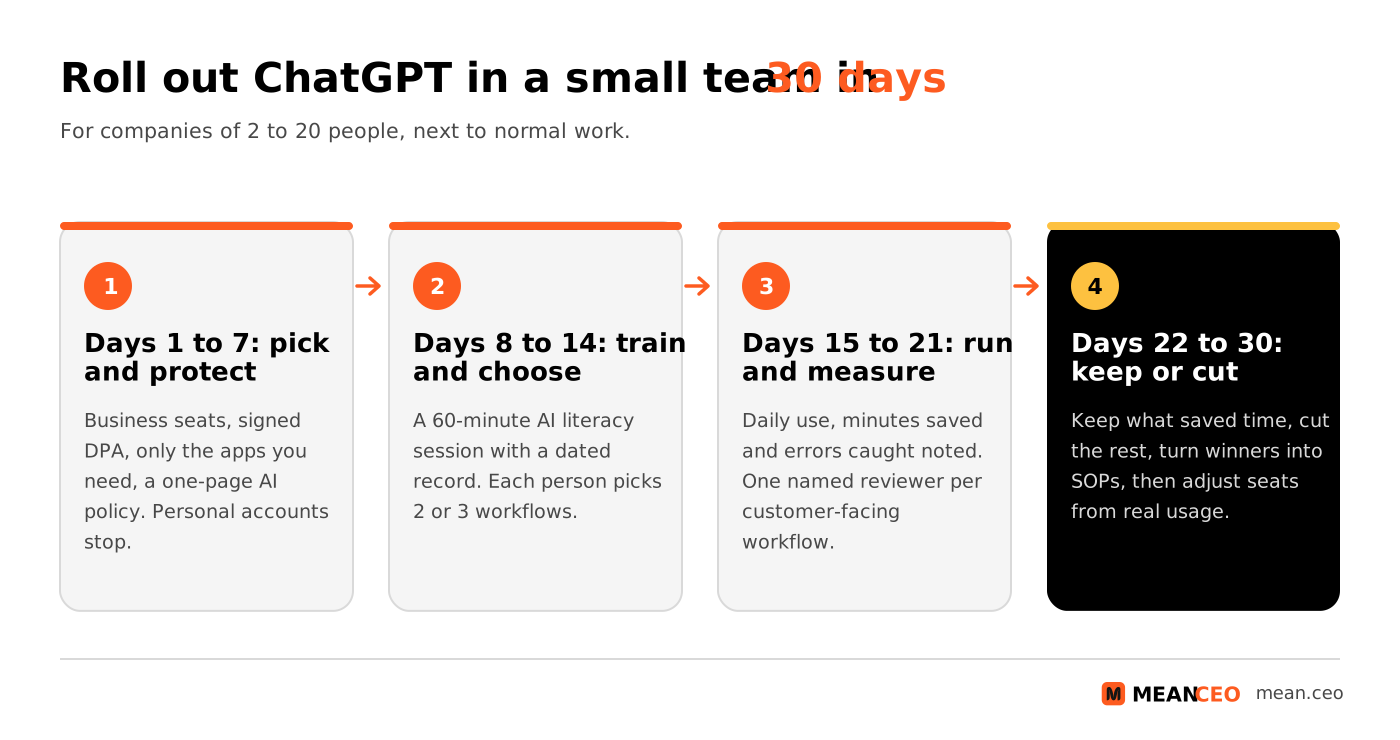
This plan fits around normal work in a company of 2 to 20 people.
- Days 1 to 7: pick and protect. Buy Business seats, sign OpenAI's DPA, switch on SSO if you have it, connect only the apps you need and write the one-page policy. Personal accounts stop being used for company work.
- Days 8 to 14: train and choose. Run the 60-minute AI literacy session, log attendance, and let each person pick two or three workflows. Every working prompt goes into a shared project.
- Days 15 to 21: run and measure. Everyone notes minutes saved and errors caught in review. Name one reviewer per customer-facing workflow.
- Days 22 to 30: keep or cut. Keep workflows that saved time with few errors, cut the rest, turn winners into SOPs and adjust Premium seats from the admin console's usage data.
When the prompt library passes twenty entries, move it into an AI knowledge base.
Using ChatGPT to find your next product line?
ChatGPT is a fine sparring partner, and a blank chat is a slow place to start. The free MeanCEO Business Idea Generator asks a few questions about your skills, budget and time and gives you five ideas in about two minutes. Then test the best one on our free Lean Canvas template before you build anything.
Where does ChatGPT earn its seat, and where does it waste it?
My verdict after watching small teams adopt it: ChatGPT earns its €21 seat in the first week on drafting, summarising and sorting, the work that sits between a raw input and a human decision. It wastes money when nobody owns the prompts, when people use it as a search engine for facts they never check, and when founders hand it decisions that need a name attached.
My prediction for 2027: the gap Eurostat shows between small and large companies will widen. A company of eight with a shared prompt library, a signed DPA and a reviewer for every customer-facing workflow beats a company of eighty that skipped those steps. Start with three workflows from the planner this week, measure for a month and keep only what pays.
FAQ: ChatGPT for business
Is ChatGPT free for business use?
Yes, the Free plan costs €0 and works at the office. OpenAI's pricing page says content on Free, Go, Plus and Pro is used to train its models unless you opt out, and OpenAI offers a DPA only for Business, Enterprise and the API. Keep customer data out of free accounts.
How much does ChatGPT Business cost per user?
On 29 October 2026 OpenAI showed €21 per seat a month billed annually, or €26 monthly, for a Standard seat, and €105 or €130 for a Premium seat with five times the usage. The page does not say whether VAT is included.
What is the minimum number of users for ChatGPT Business?
Two. OpenAI sells Business from 2 users, for teams of up to 200 employees, and you can mix Standard and Premium seats.
Does ChatGPT Business use my data for training?
Not by default. OpenAI's enterprise privacy page says it does not train on business data from Business, Enterprise or the API unless you opt in, or on data accessed from connected apps.
Can a European company use ChatGPT under the GDPR?
Yes, with conditions: use Business or Enterprise, sign OpenAI's Data Processing Addendum, remove personal data you do not need and keep a human in decisions about people. OpenAI removes deleted Business conversations within 30 days unless the law requires longer.
Can ChatGPT Business store our data in the EU?
No. OpenAI's comparison table lists data residency (EU, US, UK and seven more regions) for Enterprise only.
Do employees need AI Act training to use ChatGPT?
Companies must take measures to support the AI literacy of staff using AI under Article 4 of the EU AI Act, enforced from 2 August 2026. The Commission says no certificate is required; an internal training record is enough.
What is the difference between ChatGPT Plus and ChatGPT Business?
Plus (€23 a month) is a personal plan. Business (€21 a seat billed annually) is a company workspace with admin controls, SSO, connectors, a DPA and no training on your data by default.
About the Author
Violetta Bonenkamp, also known as MeanCEO, is an experienced startup founder with an impressive educational background including an MBA and four other higher education degrees. She has over 20 years of work experience across multiple countries, including 5 years as a solopreneur and serial entrepreneur. Throughout her startup experience she has applied for multiple startup grants at the EU level, in the Netherlands and Malta, and her startups received quite a few of those. She’s been living, studying and working in many countries around the globe and her extensive multicultural experience has influenced her immensely.
