TL;DR: What does Shopify's IP allowlist rule mean for your app?
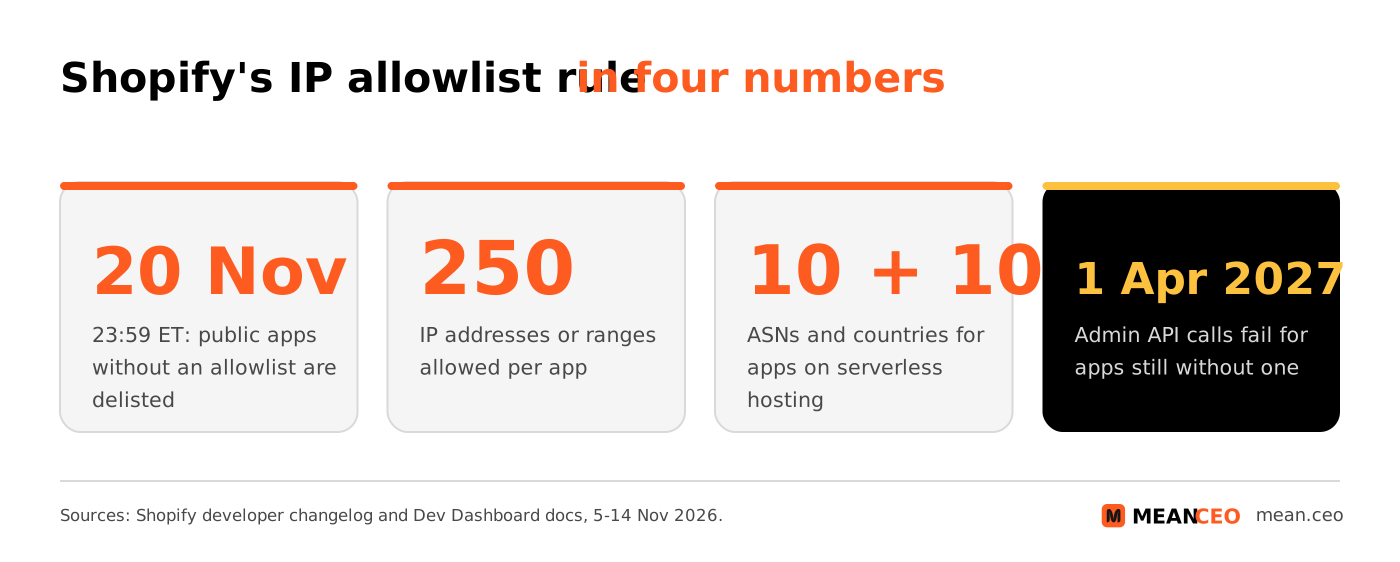
From 20 November 2026 at 23:59 Eastern Time (05:59 on 21 November in Central European Time), every public Shopify app that calls the Admin API needs an IP allowlist. Apps without one are removed from the Shopify App Store, blocked from new installs and flagged to merchants in Settings > Apps. Existing installs keep working until 1 April 2027, when Shopify starts rejecting their Admin API calls. Apps on serverless hosting can allow their provider's networks (ASNs) instead of fixed addresses. Custom apps you install on clients' stores need an allowlist for new installs from the same date, and for all installs from 1 January 2027.
If you sell a Shopify app, you have until tomorrow night to set up an IP allowlist. Shopify says it will delist apps that miss the deadline and relist them automatically once they add one.
For a solo developer or a two-person app studio, that's the difference between a normal Black Friday week and a week with no new installs. And if you run a Shopify store, the change shows up in your admin too: from 20 November, apps without an allowlist are flagged in Settings > Apps. Here's what Shopify announced, who it covers, how to set it up when your app runs on serverless hosting, and what else is due before April.
What Shopify announced
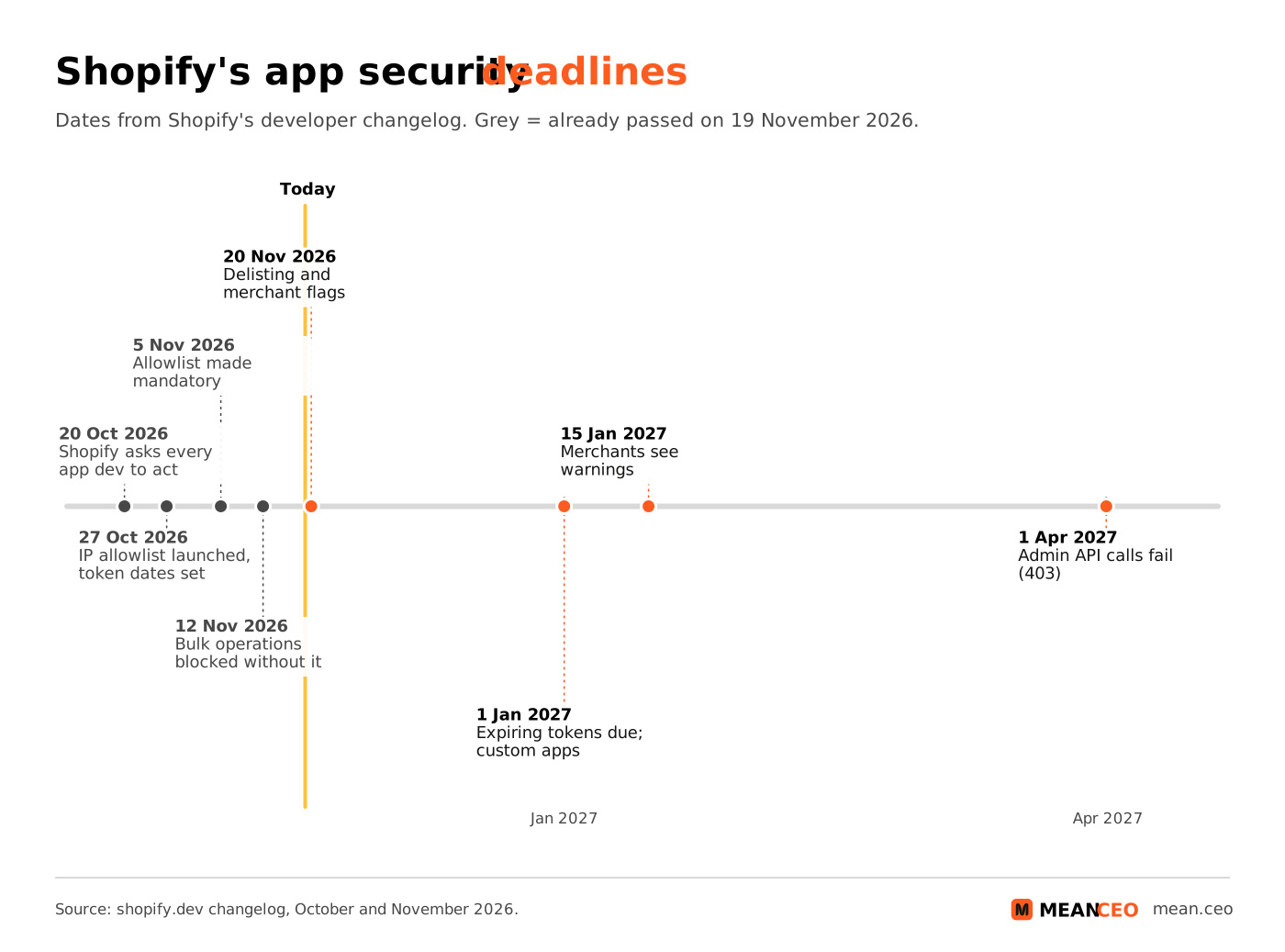
On 5 November 2026 Shopify published a changelog entry flagged "Action required": IP allowlists are now required for public apps. Public apps that use bulk operations had to set one up by 12 November, and all other public apps by 20 November, both at 11:59 PM ET. The penalties are spelled out:
- Since 12 November: bulk queries and mutations from public apps without an IP allowlist fail.
- From 20 November, 23:59 ET: public apps without an IP allowlist "will be delisted from the Shopify App Store and blocked from new installs".
- Also from 20 November: merchants can see each app's security setup in Settings > Apps, and apps without an allowlist are flagged there.
The reason is stolen access tokens. In Shopify's words, "Leaked tokens can be used from any network location." An IP allowlist ties your app's tokens to the networks you list, so a leaked token can't be used anywhere but your own servers. Shopify adds that it's asking now because "the busiest weeks of the year for merchants" are almost here.
This didn't come out of nowhere. On 20 October Shopify asked every app developer to secure their app that week, writing that "we are seeing the number of attacks increasing across the app ecosystem as AI gets better at finding vulnerabilities." It announced the allowlist as an optional feature on 27 October, then made it mandatory nine days later. Shopify didn't name a specific incident. But the pattern is familiar from the breaches we covered this month, from Railway's decrypted environment variables to the Fireworks AI key leak that reached Cursor, Notion and Uber: once a key leaks, it gets used from somewhere you don't control.
By 14 November, Shopify said the "vast majority" of apps that run bulk operations had already adopted an IP allowlist. It also confirmed that "we'll relist apps automatically once they add an IP allowlist", so missing the deadline isn't permanent. But every day without a listing is a day without new installs, in the weeks when merchants install the most.
Who has to act, and when
The rule covers every public app, meaning apps distributed through the Shopify App Store. Custom apps and apps that merchants create themselves in the Dev Dashboard or the Shopify admin are not covered by the 20 November public-app rule. But a separate entry from 11 November catches custom apps you build for clients: if you install a custom app on a store outside your organization, it needs an allowlist for new installs from 20 November and for existing installs from 1 January 2027. From that date, one of your apps without an allowlist blocks you from installing any of your apps on stores outside your organization.
The allowlist is also only one of several security deadlines. Here's the full calendar Shopify has published so far:
Sources: Shopify developer changelog entries of 27 October, 5 November, 11 November and 14 November 2026. Existing installs of public apps keep working until 1 April 2027.
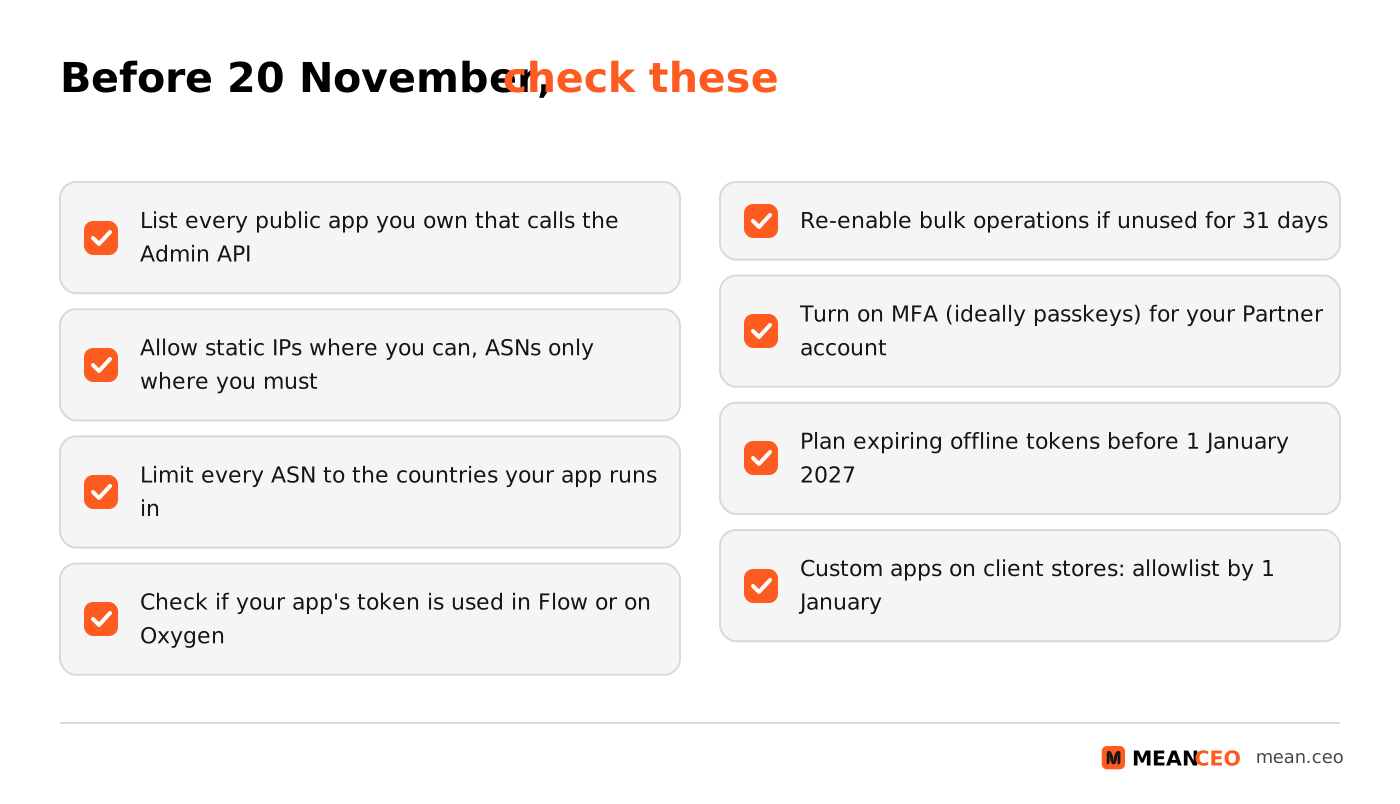
Shopify is clear that the later dates are for merchants, not for developers: on expiring offline access tokens it writes that the dates after 1 January "should not be treated as extra time to migrate". The same applies here. Two smaller changes also landed this month: since 6 November, partner apps must enable bulk operations in the Partner Dashboard and lose that access after 31 days without a bulk query or mutation, and Shopify said on 14 November that multi-factor authentication would be required on every partner account "starting next week", recommending passkeys.
How the allowlist works, including on serverless hosting
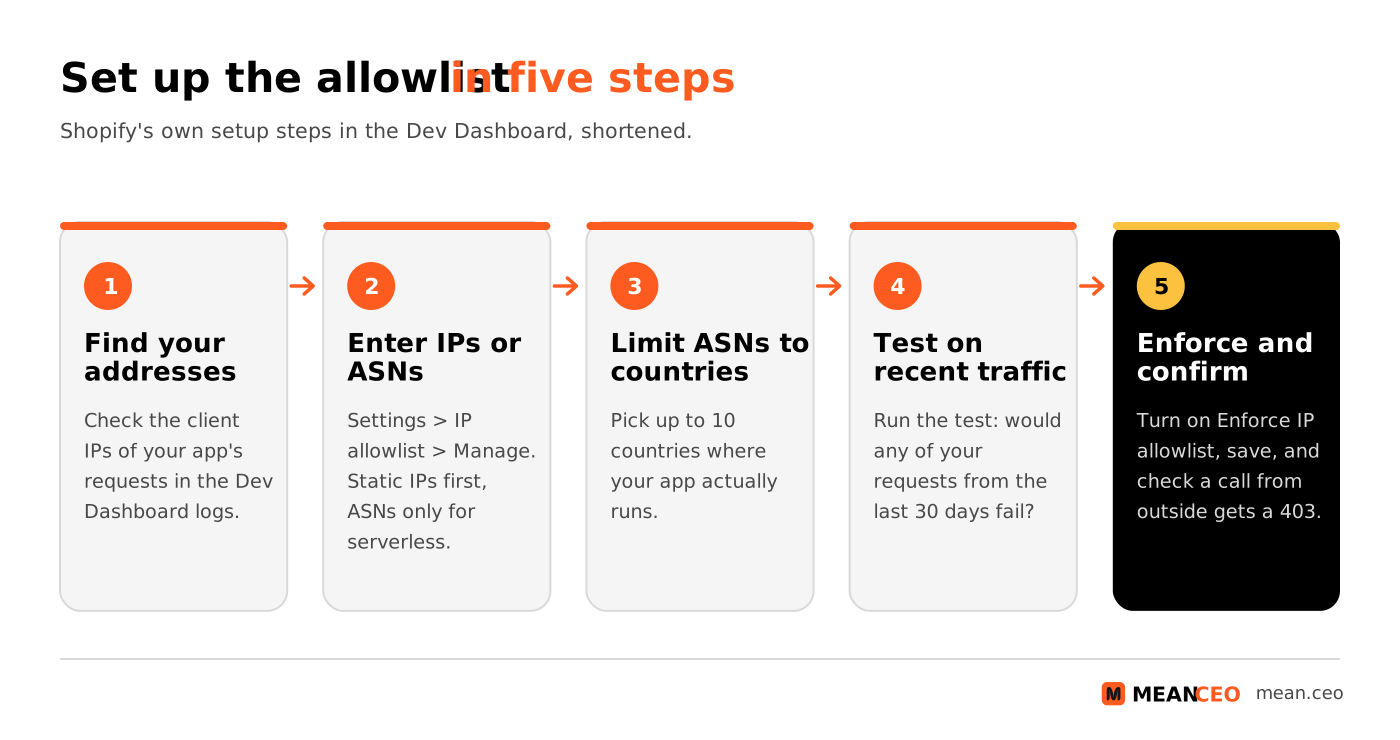
Once you turn enforcement on, Shopify checks the source IP address of every GraphQL and REST Admin API request made with your app's tokens. Requests from outside your list fail with a 403 error, and so do requests whose source address Shopify can't confirm. The setup guide in Shopify's docs gives you two kinds of entries, and since 11 November you can mix them in one list:
Source: Shopify Dev Dashboard docs, Restrict API access with an IP allowlist, checked 19 November 2026.
The ASN option is what makes this workable for indie developers on serverless platforms, where outgoing addresses change all the time. An ASN identifies a network run by one organisation, such as a hosting provider. Shopify looks up the network and country of each request in MaxMind's GeoLite data. The catch is in Shopify's own warning: a provider's network "is shared with its other customers", so anyone running servers there with a stolen token can use it. That's why Shopify recommends listing the countries your app runs in. For a European developer, that's often a short list: the one or two EU regions where your functions are deployed.
Some requests are never blocked: dev previews on development stores, and direct API access from your app's embedded pages and point-of-sale extensions. If your app makes Admin API calls from the merchant's own infrastructure, Shopify says you should change that architecture "as quickly as possible" and offers a form to request an extension.
What this means for you
- If you sell a public app, do it today. Open each app in the Dev Dashboard, add your addresses or networks, run the 30-day traffic test and turn on enforcement. A missed deadline means no new installs until you fix it, right before Black Friday.
- Prefer fixed addresses. If your host offers static outgoing IPs or a NAT gateway, use them. Use ASNs only for the parts of your app that really run on dynamic addresses, and always limit them to your countries.
- Check where your tokens travel. If a merchant's Flow workflow or an Oxygen storefront uses your app's token, those calls will be rejected once enforcement is on. Talk to those merchants before you switch.
- If you build custom apps for clients, list every install. New installs on client stores need an allowlist from 20 November, and from 1 January one app without it blocks all your installs outside your organization.
- If you run a Shopify store, look at Settings > Apps after 20 November. A flagged app isn't broken, but ask its developer when they'll fix it. Apps that also handle checkout or tracking code deserve extra care, as the Optimizely skimming attack on 178 sites showed.
- Treat this as part of your GDPR homework. Most app developers act as data processors for their merchants. Under GDPR Article 33(2) (Adopted law), a processor must tell the controller "without undue delay" after it becomes aware of a personal data breach, and Shopify says you're responsible for notifying affected merchants. An allowlist won't stop a leak, but it limits what a leaked token can do. Our guide on how to build security into a startup covers the rest of the basics.
My take: this is a platform doing what platforms should do, just with very little notice. Fifteen days from "required" to delisting is tight for a solo developer, and the ASN option is a compromise Shopify itself calls weaker. But leaked keys are the story of this autumn, from Claude Code users leaking secrets to public GitHub repos to hosting platforms breached for their environment variables. If your business depends on someone else's platform, as almost every bootstrapped app business does, you live by their rules and their timelines. The founders who handle this calmly are the ones who already know where their app runs, which keys it holds and who can reach them. For the rest of this month's platform changes, see our Shopify news for November 2026 and cybersecurity news for November 2026. If you sell physical products and need help beyond your app stack, our guide to DTC ecommerce agencies for Amazon sellers on Shopify is a good starting point.
Are you getting customers from AI search yet?
More and more traffic is coming from Perplexity, ChatGPT, Grok and other AI tools.
👉 Rank on ChatGPT
FAQ: Shopify's IP allowlist requirement
When is the Shopify IP allowlist deadline?
20 November 2026 at 11:59 PM Eastern Time, which is 05:59 on 21 November in Central European Time. Public apps that use bulk operations had an earlier deadline of 12 November.
What happens if my public app has no IP allowlist?
It's delisted from the Shopify App Store, blocked from new installs and flagged to merchants in Settings > Apps. Existing installs keep working, merchants see a warning from 15 January 2027, and Shopify rejects the app's Admin API requests from 1 April 2027. Shopify relists apps automatically once they add an allowlist.
Does the rule apply to custom apps?
Not the 20 November public-app rule. But custom apps installed on stores outside your organization need an allowlist for new installs from 20 November 2026 and for all installs from 1 January 2027. Apps installed only in your own organization, and apps created by merchants, aren't affected.
My app runs on serverless hosting. What do I allow?
Your hosting provider's autonomous system numbers (ASNs), up to 10, limited to up to 10 countries. Shopify warns that other customers of the same provider share that network, so use fixed IP addresses wherever you can and keep the country list short.
How many IP addresses can I add?
Up to 250 IP addresses or CIDR ranges per app, public addresses only, with IPv4 ranges of /16 or narrower and IPv6 ranges of /32 or narrower. Since 11 November you can combine addresses and ASNs in one allowlist.
What other Shopify app deadlines are coming?
Public apps must move to expiring offline access tokens by 1 January 2027 or be delisted, with merchant warnings from 15 January and failing API calls from 1 April 2027. Partner apps also need bulk operations enabled in the Partner Dashboard, and Shopify is making multi-factor authentication mandatory for partner accounts.
About the Author
Violetta Bonenkamp, also known as MeanCEO, is an experienced startup founder with an impressive educational background including an MBA and four other higher education degrees. She has over 20 years of work experience across multiple countries, including 5 years as a solopreneur and serial entrepreneur. Throughout her startup experience she has applied for multiple startup grants at the EU level, in the Netherlands and Malta, and her startups received quite a few of those. She’s been living, studying and working in many countries around the globe and her extensive multicultural experience has influenced her immensely.
