TL;DR: Internal Linking Strategy for Startup Blogs
Internal links are the cheapest SEO lever a bootstrapped startup has: they help readers find your next useful page, help Google find and understand your pages, and send attention to the pages that make money. Group posts around pillar pages, write anchor text that says what the reader gets, link every new post from older related posts, and audit for orphan pages and broken links every quarter. Google’s own rule of thumb: “Every page you care about should have a link from at least one other page on your site.”
💡 New to SEO? See how to build organic traffic on a lean budget in SEO for Startups: Building Organic Traffic Without Backlinks.
Internal Linking Strategy for Startup Blogs: A Complete Guide to Boost Traffic and SEO
An effective internal linking strategy for startup blogs isn’t just an SEO booster; it’s the backbone of better user navigation and a critical tool for amplifying topical authority. As a startup founder, you often operate with limited resources, so leveraging every opportunity to grow organically is a must. Internal linking stands out because it allows you to connect pages strategically, guiding both users and search engines to prioritize your most important content.
The value is particularly clear in Europe, where competition for organic visibility is fierce, and language diversity can create unique SEO challenges. As a serial European entrepreneur who has bootstrapped multiple ventures like Fe/male Switch, I’ve seen firsthand how internal linking can transform content from simply existing to ranking and converting effectively.
“Internal links act as the connective tissue of your website, distributing link equity and helping both users and Google understand the structure and relevance of your content.”
Are you optimizing internal links in your blog content?
Learn how startup blogs use internal linking to rank higher in Google and get cited by AI tools like ChatGPT and Perplexity.
👉 Advanced Internal Linking Strategies
Why Is Internal Linking Crucial for Startups?
Startups often lack the luxury of unlimited marketing budgets, which makes organic growth a priority. Internal linking is a zero-cost strategy that delivers results by:
- Improving user experience: Links guide readers to the next useful page, so they stay longer and understand more of what you offer.
- Helping discovery: Google says it “primarily finds pages through links from other pages it already crawled”. A post nobody links to is hard to find, for people and for crawlers.
- Building authority: Links pass value (often called link equity) from one page to another, so you can send it to your most important pages.
- Boosting topic relevance: Linking related posts shows the depth of your expertise in a niche, and the anchor text tells Google what the linked page is about.
This is especially valuable during the early stages of building your content clusters, a practice that detailed guides like Building Content Clusters That Drive Organic Traffic delve into more comprehensively. Clusters not only improve navigation but also create clear topical depth that search engines recognize and reward.
How to Build an Internal Linking Strategy for Startup Blogs
Creating an internal linking structure for startup blogs doesn’t require a degree in SEO. Here’s a simplified, actionable roadmap you can follow as early as Week 1 of launching your blog:
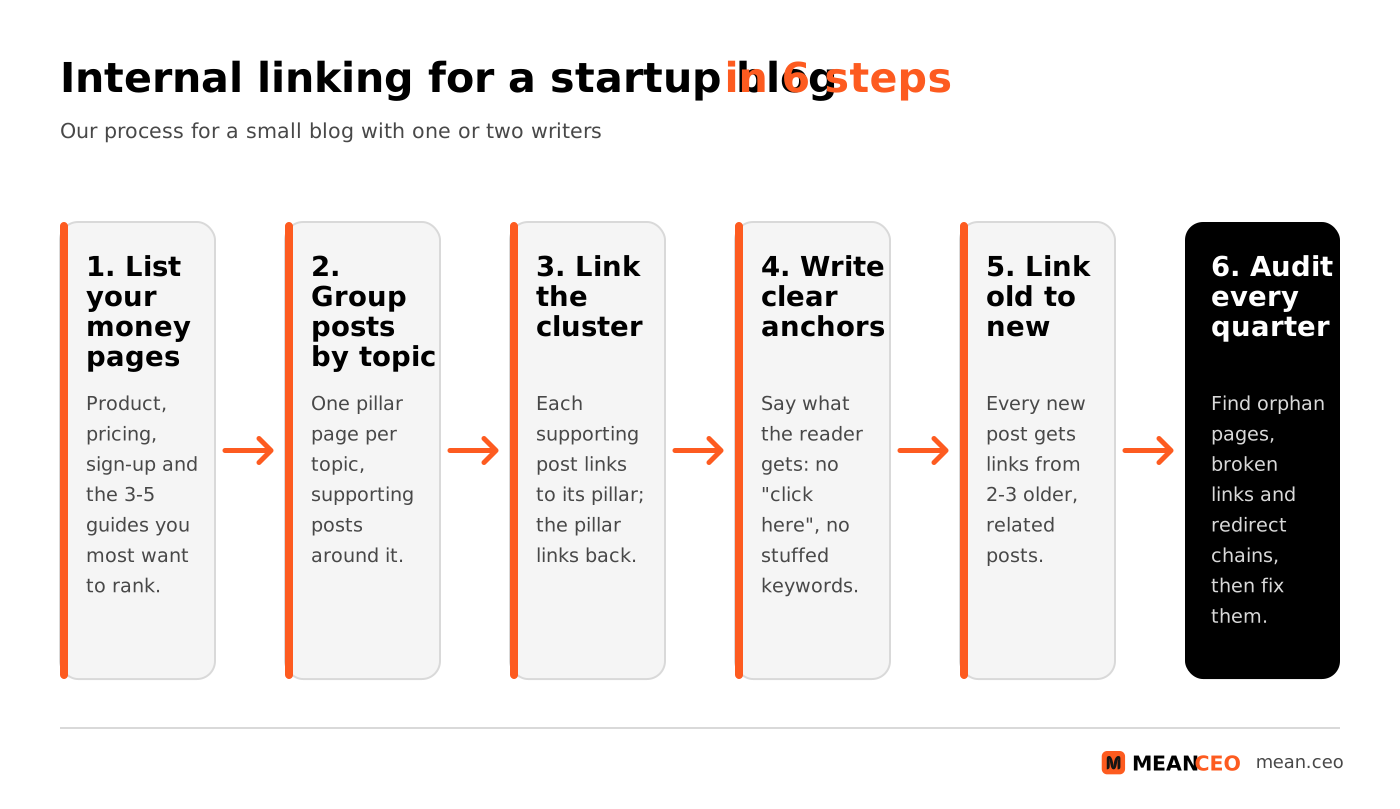
1. Start with Pillar Pages
Pillar pages serve as comprehensive hubs within a particular niche. For example, if your blog focuses on AI tools for startups, your pillar might be "Top AI Platforms for Bootstrapped Founders." Every supporting article would explore related subtopics and link back to this page. By doing this, you help search engines identify your pillar as the authoritative resource.
Our assessment, for a blog of 20 to 500 posts. Our 90-day plan for topical authority shows how to choose the topics for your pillar pages.
2. Diversify Anchor Text
Anchor text, the clickable words on a link, tells readers and Google what to expect. Google’s link best practices say good anchor text is “descriptive, reasonably concise, and relevant to the page that it’s on”, and list “Click here” and “Read more” as too generic. Use descriptive anchors such as “our technical SEO checklist” instead. The same page warns against cramming keywords into anchors: “If it feels like you’re forcing keywords into the anchor text, then it’s probably too much.”
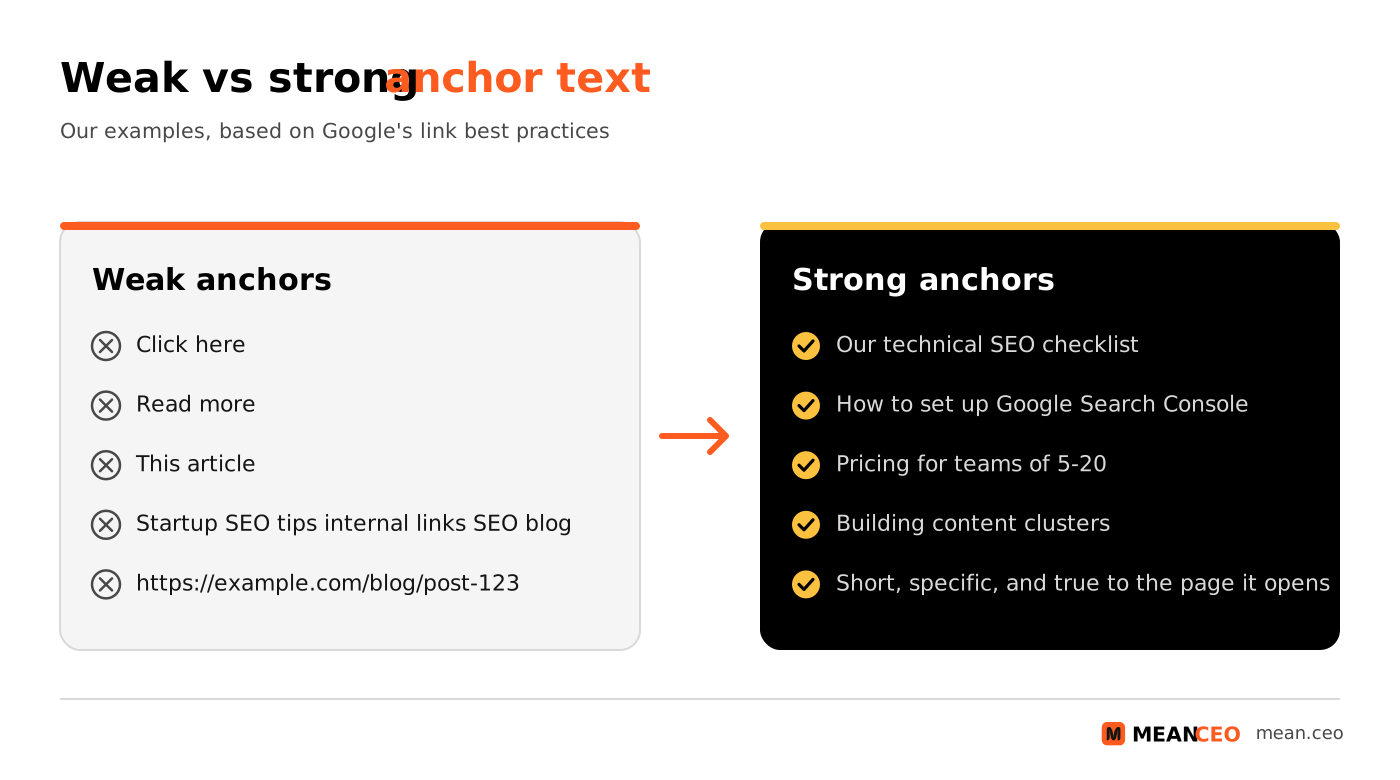
You don’t need to vary anchors for the sake of it. When asked about repeated internal anchors, Google’s Gary Illyes said in 2019 that there is no internal-linking over-optimisation penalty he knew of. Write what describes the page best, and use different wording where the context calls for it.
3. Map Internal Links to Important SEO Pages
Every startup blog will have certain pages you want to prioritize, be they landing pages, product pages, or pillars. For a page to rank higher, distribute your internal links strategically so that these high-value pages benefit from the authority of all your blog content.
For example, imagine your blog post on content publishing tips. You’d naturally link to guides on Content Velocity and other related subtopics, ensuring thematic continuity and better user satisfaction.
How Many Internal Links Per Post?
There is no fixed number. Google once advised keeping links on a page under 100; in a 2013 video Matt Cutts explained that Google dropped that guideline and now just says to keep it to a reasonable number. The largest public study we know of points the same way. Zyppy analysed 23 million internal links across 1,800 websites and found that URLs with 40–44 internal links got about four times the Google clicks of URLs with 0–4, but that the effect reverses after about 45–50 links. It’s a correlation study, so treat it as a sign that most small blogs link too little, not as a target.
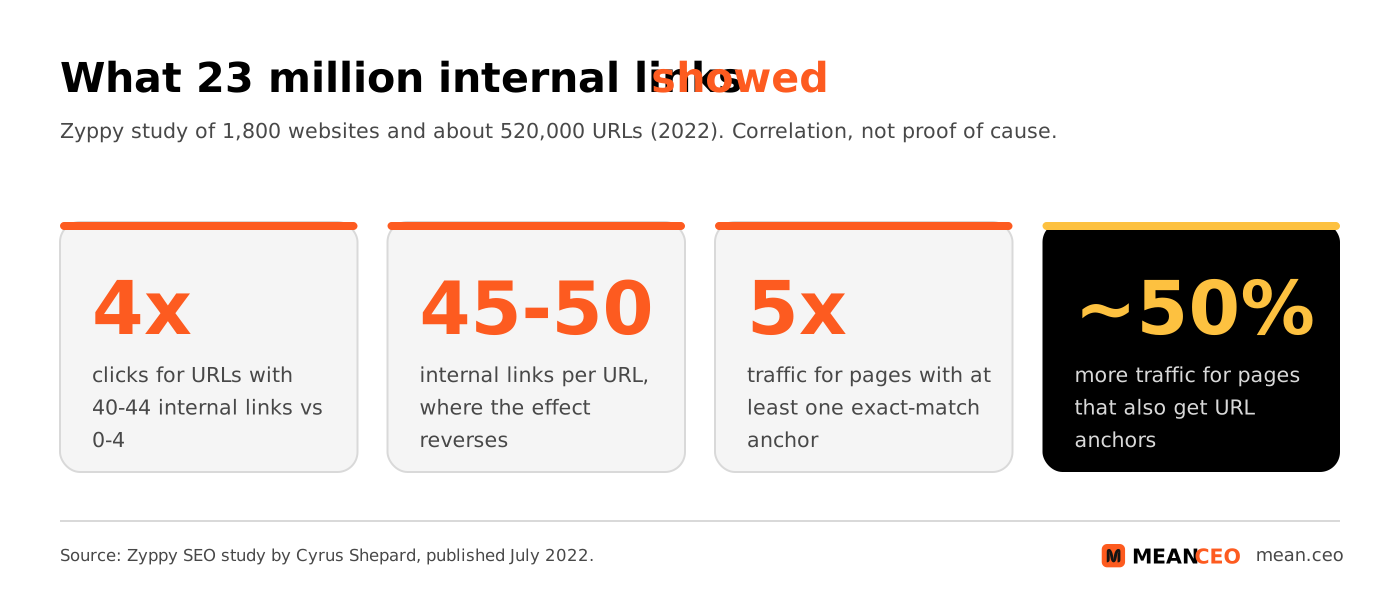
In practice, link wherever a reader would genuinely want the next page: a few links in the body of a 2,000-word guide, plus your navigation and a related posts block, is normal. Put the most important links high in the text, where people actually read.
4. Regularly Audit and Refresh Links
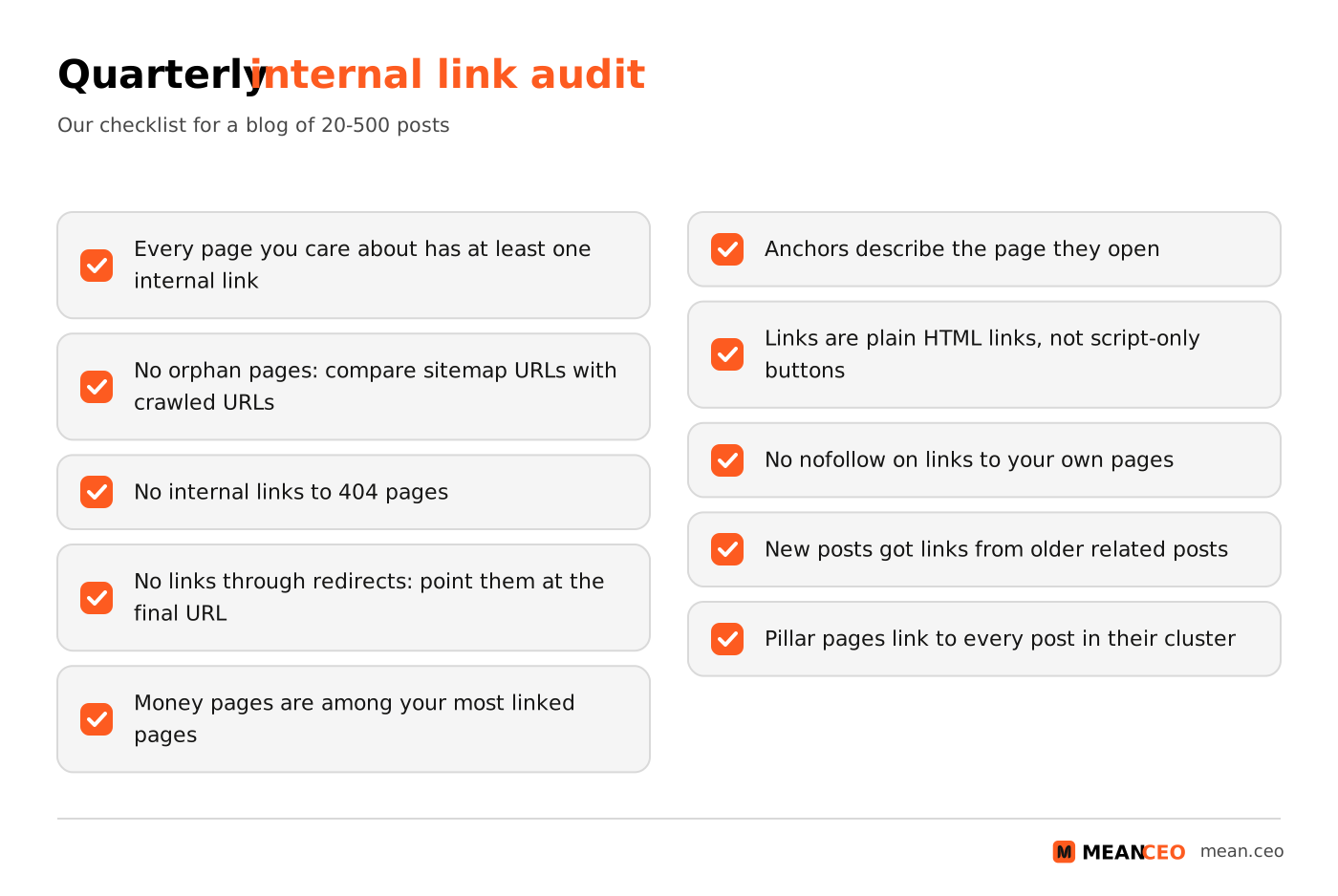
As your blog grows, links break, posts move and new pages end up with no links at all. Every quarter, crawl your site, find broken or redirected internal links and orphan pages, and fix them. Search Console’s Links report shows your most linked pages in “Top linked pages from within your own site”. It’s a sample and stops at 1,000 rows, but it quickly shows whether your money pages are near the top.
Orphan pages and weak linking are common even on established sites. Ahrefs’ study of over 1 million domains found that 66.2% of sites had at least one page with only one dofollow internal link pointing to it.
Our assessment, based on Google’s link best practices and the crawlers’ reports.
Tools for Auditing Internal Links on a Budget
Prices from vendors’ pricing pages, viewed from Europe on 4 November 2026; Link Whisper lists USD only. Our guide to SEO tools for bootstrapped founders compares the wider toolkits.
Common Internal Linking Mistakes to Avoid
Even the best internal linking plans can go wrong. Here are failure points you must avoid:
- Stuffing links: Overloading an article with links dilutes their value and overwhelms readers. Google’s Matt Cutts explained in 2013 that a page’s PageRank is divided across its outgoing links.
- Using irrelevant links: Context matters. A travel article linking to your tech pillar page confuses both users and search engines.
- Leaving orphan pages: Pages with no internal links are hard for Google to find and may not be crawled or indexed at all.
- Links Google can’t follow: Google says it can generally only crawl a link if it’s an HTML anchor element with an href attribute. Menus and buttons that work only through JavaScript may hide pages.
- Nofollow on your own pages: Google’s advice for internal links you don’t want crawled is robots.txt, not nofollow, and Google’s John Mueller called internal PageRank “sculpting” a waste of time in 2019.
- Linking through redirects: After a URL change, update the links to point at the new URL, so readers and crawlers don’t take a detour.
- Keyword-stuffed anchors: Forcing keywords into every anchor reads badly, and Google’s link guidance warns that keyword stuffing breaks its spam policies.
“The strength of your blog structure lies in meaningful rather than excessive connections. Less is often more when it comes to interlinking effectively.”
What Comes Next: Scaling Content and Linking
Once your internal linking strategy delivers results, your task shifts to scaling. Create additional content clusters around related topics, like “SEO for Startups: Building Organic Traffic Without Backlinks” (explore this framework), and weave them into other relevant blog hubs.
Start integrating performance monitoring (via tools like Semrush or Ahrefs) to identify which of your interlinked pages drive the most engagement. Replicate their success formula by pinpointing whether it’s the content depth, page speed, or internal-click depth that's contributing.
Internal Linking for Multilingual European Blogs
Many European startups publish in two or more languages. Treat each language as its own set of clusters: link a German post to German posts, and give each language version its own pillar pages. Hreflang tags tell Google which version to show in which country, but they don’t replace in-text links. When you do link to a page in another language, say so in the anchor, for example “our English guide to VAT”. Our multi-country SEO playbook covers the wider set-up. Our assessment, based on Google’s link and localised versions guidance.
Are you getting customers from ChatGPT yet?
More and more traffic is coming from Perplexity, ChatGPT, Grok and other AI tools.
👉 Rank on ChatGPT
Final Thoughts: Why Internal Links Are Key to Scaling
Internal linking is your blog’s hidden growth multiplier, especially if you’re bootstrapping your startup and rely on organic search. It costs nothing but time, and every link you add today keeps working for as long as both pages are live. Results depend on your content and your competitors, so measure clicks and positions for the pages you linked to, and adjust.
Remember, the key isn’t just linking, it’s linking with context and intention. Use this strategy to address the gaps most startup founders have in SEO knowledge, and you’ll stand out across search engines and even new generative AI platforms.
Next up? Apply these principles while refining your overall content marketing strategy, and when you refresh an old post, use the chance to add links to and from it; our guide to updating old content for better rankings shows how.
People Also Ask:
What is internal linking in blogs?
Internal linking refers to adding hyperlinks within a website to connect different pages. This practice improves navigation, helps search engines understand site structure, and distributes link authority, boosting overall SEO. It also guides users to additional information, enhancing their experience.
How does internal linking help startup blogs?
Internal linking helps startup blogs by directing readers to relevant content, increasing time spent on the site. It strengthens content visibility, making it easier for search engines to crawl the pages, ultimately improving rankings. For startups, it’s a cost-effective way to improve search traffic.
How many internal links should a blog post have?
There is no fixed number. Google says to keep links to a reasonable number, and Zyppy’s study of 23 million internal links found that pages with more internal links tended to get more clicks, up to about 45–50 links per URL. In practice, add a link wherever a reader would genuinely want the next page, and make sure every important page gets links from several related posts.
What is the ideal internal linking structure for startup blogs?
An ideal internal structure is a hierarchical flow with the homepage at the top, category or topic clusters below, and individual blog entries under those clusters. This allows search engines and users to find content easily while boosting the domain’s topical authority.
Why is anchor text important for internal links?
Anchor text is important because it provides search engines and readers with context about the linked page. Using descriptive and relevant anchor text improves SEO and encourages clicks by signaling clearly what users can expect on the linked page.
What are common mistakes in internal linking?
Common mistakes include linking unrelated pages, overstuffing links, using vague or generic anchor texts like 'click here,' and neglecting to update links when URLs change. These practices harm SEO and reduce the user's trust in your site's content.
Do internal links improve SEO for small, bootstrapped startups?
Yes. Internal links cost nothing but time, so they stretch a small marketing budget further. Connecting your best content to your product pages helps both readers and Google find the pages that matter, which is especially useful in niches where big competitors don’t publish in-depth guides.
What tools can startups use for auditing internal links?
Screaming Frog (free up to 500 URLs), Ahrefs Free for verified sites and Google Search Console’s Links report cover most small blogs at no cost. Semrush Site Audit adds an Internal Linking report, and in WordPress, Yoast SEO Premium, Rank Math or Link Whisper suggest links as you write. See the tools table above for prices.
How can you implement internal linking for new blog content?
When publishing new posts, identify relevant existing articles and add hyperlinks to them. Within the new content, include links to cornerstone articles or other resources, ensuring the links flow naturally and add value for readers.
What role does internal linking play in a startup’s growth strategy?
Internal linking helps startups by enabling better indexing of content, strengthening content clusters, and promoting targeted growth in niche areas. This is especially useful for bootstrapped startups aiming to establish authority with minimal spending.
FAQ on Internal Linking Strategy for Startup Blogs
How does internal linking improve blog navigation for readers?
Internal linking guides readers to higher-value or related content and keeps them engaged. By interconnecting posts logically, you create a clearer navigation journey, encouraging users to stay on-site longer and explore more of your expertise.
What is the connection between internal links and search engine rankings?
Internal links help search engines discover and index pages. They pass link equity and indicate page relevance, improving rankings. For detailed PageRank flow tips, explore efficient internal linking for PageRank improvements.
Why should startups prioritize pillar pages in their internal linking strategy?
Pillar pages serve as a central authority on a topic. Linking clusters of related content to a pillar boosts topical authority, helping both readers and search engines see it as the core resource. This approach improves traffic and engagement.
How often should startups audit internal links on their blog?
Audit internal links quarterly to fix broken links, update outdated anchors and add links to new pages. Use Screaming Frog, Ahrefs Free or Semrush Site Audit for the crawl and Google Search Console to check your most linked pages and indexing; our guide to Google Search Console metrics that matter explains the reports.
What are the risks of overloading a blog with internal links?
Too many links can confuse readers and dilute link equity. Use contextual and purposeful linking rather than stuffing links randomly to maintain a clean and user-friendly experience across your blog pages.
Should internal links focus only on keyword-rich anchor text?
No. Use whatever describes the linked page best: sometimes that’s the main keyword, sometimes a natural variation or a question. Repeating the same descriptive anchor for internal links is fine; what to avoid is cramming keywords into anchors and generic phrases like “click here”, which tell readers nothing.
How does internal linking help a startup get visibility in AI-driven search engines?
Internal linking strengthens content structure and signals topical relevance to AI-based tools. For a tailored approach to achieving AI citations, refer to visibility strategies in AI searches.
What is the role of content clusters in a successful internal linking strategy?
Content clusters group posts around a central topic, linking to a pillar page that ties them together. This structure shows your expertise to readers and search engines and gives visitors a clear path through the topic. Our guide to building content clusters shows how to plan one.
Is it essential to interlink older posts with new blog content?
Yes. Links from older posts help readers and search engines find your new content quickly, and links from new posts back to strong older ones keep those pages in use. Make it a habit: every new post gets links from 2–3 older related posts on the day it goes live.
How does internal linking affect the crawl budget for startup blogs?
For most startup blogs, crawl budget isn’t a problem. Google’s crawl budget guide is written for sites with 1 million+ pages that change weekly, or 10,000+ pages that change daily, and says that for other sites keeping the sitemap up to date and checking the Page Indexing report is adequate. Internal links still matter for discovery: a page with no links pointing to it may not be found or indexed. Our technical SEO checklist covers indexing checks.
About the Author
Violetta Bonenkamp, also known as MeanCEO, is an experienced startup founder with an impressive educational background including an MBA and four other higher education degrees. She has over 20 years of work experience across multiple countries, including 5 years as a solopreneur and serial entrepreneur. Throughout her startup experience she has applied for multiple startup grants at the EU level, in the Netherlands and Malta, and her startups received quite a few of those. She’s been living, studying and working in many countries around the globe and her extensive multicultural experience has influenced her immensely.
