TL;DR: What happened in the Microsoft 365 outage?
The Microsoft 365 outage of 12 and 13 November 2026 cut access to Outlook and Exchange Online email and broke parts of Teams, SharePoint and Copilot for companies around the world. Problems hit Europe from Thursday evening. Microsoft's own status record first counted about 30 hours, and its post-incident report now puts the customer impact at about 24 hours, from 16:20 UTC on 12 November to 16:10 UTC on 13 November. The root cause was a hidden Windows defect on Microsoft 365's network gateway servers, from an update rolled out since July, which locked servers up under peak US load while Teams traffic had shifted onto the same gateway and nearly 14% of its capacity was offline. It was not a cyberattack. Delayed emails were held for up to 48 hours and then delivered. For a small team, the lesson is a one-hour drill: a backup chat, offline copies, a customer notice and a log for the service credit claim.
Last updated 21 Nov 2026, 10:25 CET: cause and times now follow Microsoft's post-incident report (preliminary 15 November, final 20 November).
Microsoft 365 outage searches spiked on Thursday evening and kept climbing on Friday, when Europe woke up to mailboxes that still wouldn't load. In Belgium alone, "Microsoft storing" (Dutch for Microsoft outage) passed 20,000 Google searches. If your company runs its email, calendar and files on Microsoft 365, this was the day your whole office went quiet at once.
Here is what Microsoft has confirmed, what it still owes customers, and the drill I'd run this week so the next outage costs you an afternoon instead of two days.
What happened during the Microsoft 365 outage on 12 and 13 November?
Microsoft's public status page closed the incident with a short final note: services across the affected environments had fully recovered and the email backlog was processed, and Microsoft's post-incident report later set the customer impact at about 24 hours. Here is how it unfolded, times in UTC, from Microsoft's incident updates as reported by BleepingComputer, TechRadar and CNN, with the times from the post-incident report added:
- 12 Nov, 14:45 to 15:53: a separate Teams incident (TM1550488) delays and drops messages for users in North and South America. Microsoft blames resource contention and resolves it.
- 12 Nov, 01:07: after a routing problem in US East, Teams traffic fails over automatically to the network gateway that Exchange Online also uses (post-incident report).
- 12 Nov, 16:20: customer impact starts as US traffic nears its daily peak, according to the post-incident report. Within two hours more than 80% of the gateway servers stop responding.
- 12 Nov, afternoon: Microsoft investigates Exchange Online mailbox problems in the Americas under EX1550543.
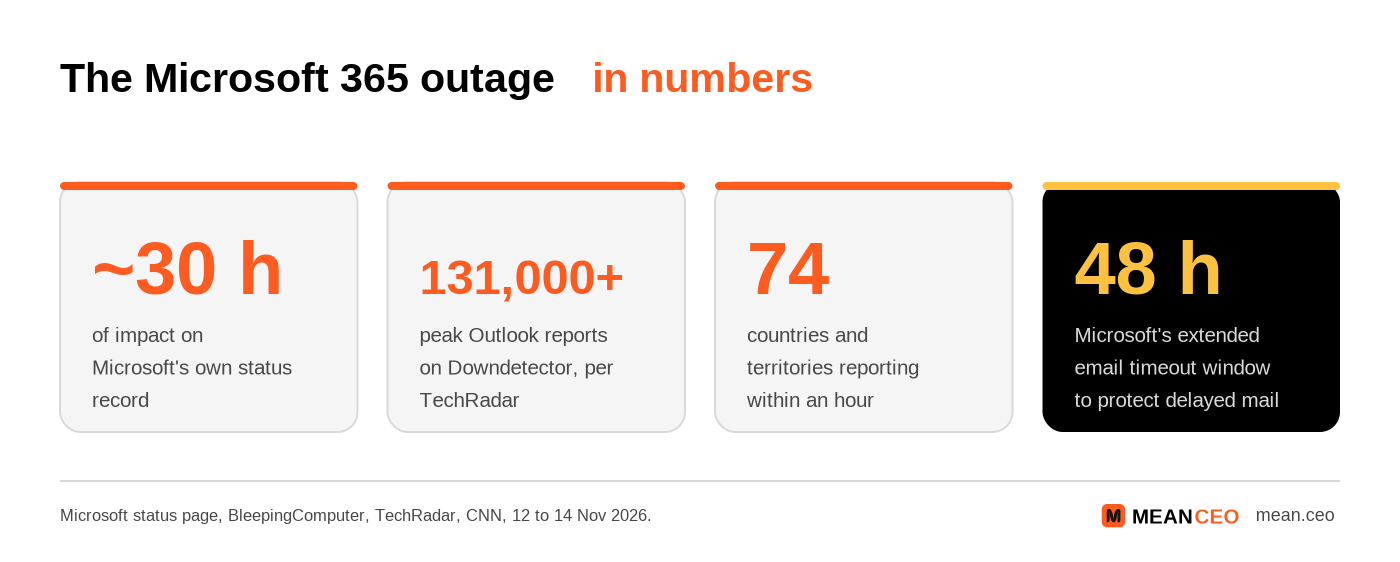
- 12 Nov, 17:30: about 120,000 reports pile up on Downdetector across the US, according to TechRadar. Outlook later peaks at more than 131,000.
- 12 Nov, 18:26: Microsoft opens MO1550821: users may be unable to connect to Exchange Online, Teams, SharePoint Online, Microsoft 365 Copilot and Defender XDR, in any region.
- 12 Nov, evening: Microsoft pauses all deployments, restarts servers and tests an alternative health check that brings a first group of servers back.
- 13 Nov, morning: Microsoft extends its email timeout window to 48 hours so delayed messages aren't bounced, and says it sees no sign of malicious or cyber activity.
- 13 Nov, during the day: recovery spreads, with North America ahead of Europe and Asia; Microsoft names the cause and apologises.
- 13 Nov, 16:10: end of customer impact, per the post-incident report. Monitoring and clearing of the email backlog continue.
- 14 Nov, 03:51 to 04:15: Microsoft's status page posts its final update (services fully recovered, email backlog processed), and the report marks the incident resolved at 04:15.
- 15 and 20 Nov: Microsoft publishes its preliminary and then its final post-incident report under EX1550543 in the admin center.
Downdetector told CNN that reports reached 74 countries and territories in about an hour, and that nearly 3 in 10 reports between 17:00 and 18:55 UTC came from outside the US. Japan's government said ministries couldn't send email for most of the Friday workday, and the UK government said it was working with Microsoft to check the impact on public services.
Belgium felt it on Friday morning. Eight Brussels municipalities, including Brussels City, Anderlecht, Schaerbeek and Ixelles, couldn't be reached by email, BRUZZ reported, and Brussels Airlines warned that booking confirmations by email were partly unavailable. The Flemish business organisation Unizo spoke of "enorme hinder" (huge disruption) for the self-employed and small firms, and told VRT that one in two SMEs couldn't keep running without digital services like these, while barely 1 in 10 has an emergency plan for a cyber incident.
What caused the Microsoft 365 outage?
Microsoft's explanation came in three steps. On Thursday it said the load problem wasn't extra traffic: "a number of servers being unexpectedly unavailable; straining the remaining infrastructure", as BleepingComputer reported. The servers were failing Microsoft's own automated health checks, so the system took them out of service, which pushed more work onto the servers that were left.
On Friday the official Microsoft 365 account gave a first cause in one sentence, quoted by TechRadar: "The incident was introduced by an issue during an earlier network capacity upgrade that surfaced following a recent network change." It added that this was "a technical issue not related to cyber or AI / agents" and that services were restored gradually, checking stability at each stage, which took longer.
Charles Lamanna, Microsoft's executive vice president for Copilot, Agents and Platform, told BleepingComputer that Microsoft regrets "the impact these outages had on those who depend on us" and is reviewing how to prevent it.
Update 21 November: the real root cause. Microsoft's post-incident report, a preliminary version on 15 November and the final one on 20 November, replaces that one-liner. The trouble sat in Microsoft 365's network gateway, the front door that Exchange Online and many other services pass through. A Windows update for those gateway servers, rolled out from July, ran for more than three months without a problem. Under heavy load, an internal Windows process got stuck in lock contention (tasks waiting on each other) and used up the server's CPU and memory. Only the newer servers with more cores were hit, and Microsoft's load tests ran on older machines, so the defect slipped through.
Three things then lined up on 12 November. Teams traffic had failed over to the same gateway after a routing problem in US East at 01:07 UTC, nearly 14% of the gateway's capacity was out of service, and US traffic reached its daily peak. Servers locked up, traffic management moved their load to the healthy ones, and those locked up too. At the lowest point more than 80% of the servers were unresponsive, and failover carried the problem into other regions. Microsoft says no enterprise mail was lost and customer data at rest wasn't touched; delayed mail to consumer mailboxes inactive for more than 30 days did expire. The report's repair items and next steps run into 2027, and it says nothing about service credits. Office-Watch.com and 365Fanatic publish the report's text for anyone without admin access. Microsoft promised a post-incident report with the full root cause and repair items, and it delivered one.
Which Microsoft 365 services were affected?
Sources: Microsoft's incident text as reported by BleepingComputer, TechRadar and CNN. The pattern matters: almost everything that broke depended on Exchange Online, the email and calendar engine under Microsoft 365. When it went down, calendars, meeting invites and Copilot answers that read your mail went with it.
Did you lose any email in the Microsoft 365 outage?
Most likely not. Sending mail servers keep retrying when the receiving side doesn't answer, and Microsoft stretched its own timeout window to 48 hours during the incident so held messages weren't returned to senders. That is why many people got a wave of old emails on Friday. Two checks are still worth five minutes:
- Look for bounce messages from Thursday and Friday in your own sent folder and ask your most important customers whether anything came back to them.
- Check time-sensitive mail: invoices, contract signatures, password resets and one-time codes sent during the outage expired while they sat in the queue. Ask for new ones.
What does the Microsoft 365 outage mean for your startup?
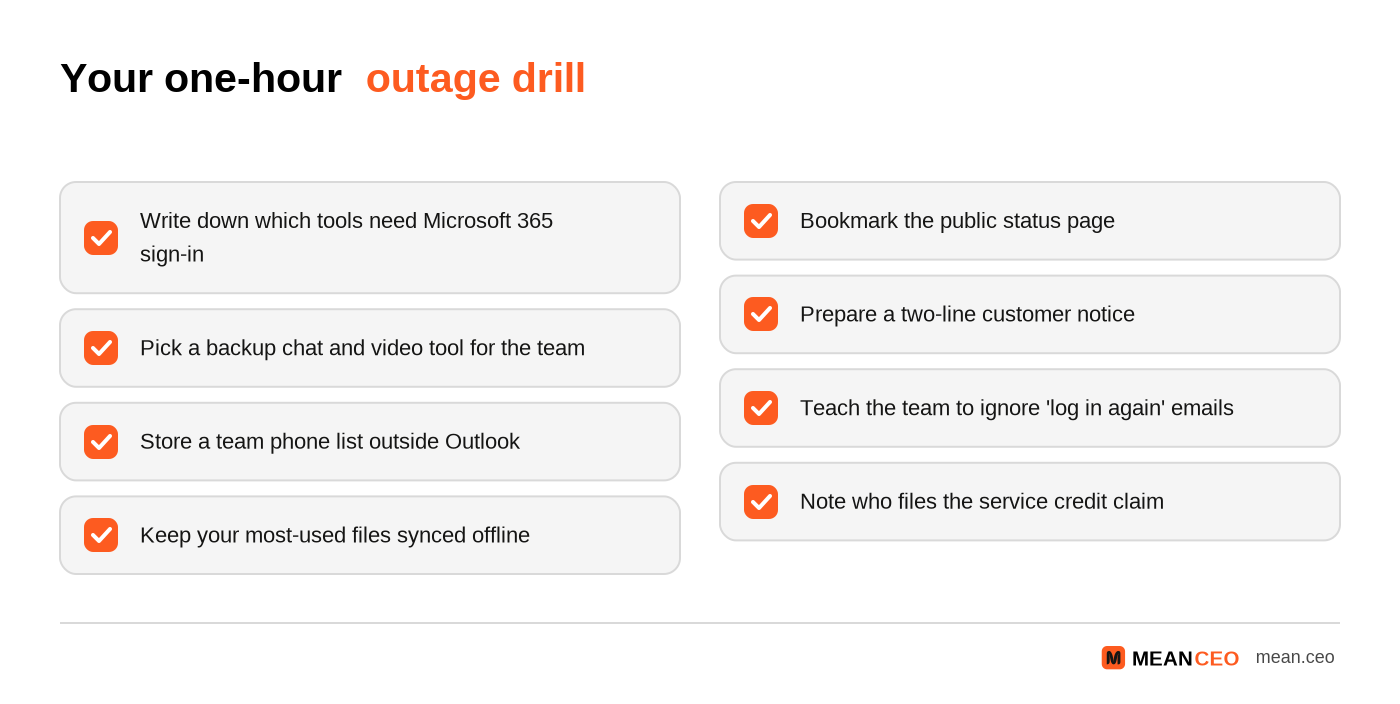
Small companies put everything in one Microsoft 365 tenant because it's cheap and simple: email, calendar, Teams calls, files and now Copilot. That bundle is also a single point of failure. This is the third big supplier outage we've covered in four weeks, after the Revolut outage during Google Cloud's power failure and the ten-hour Orange mobile outage. Here is the drill I'd run this week:
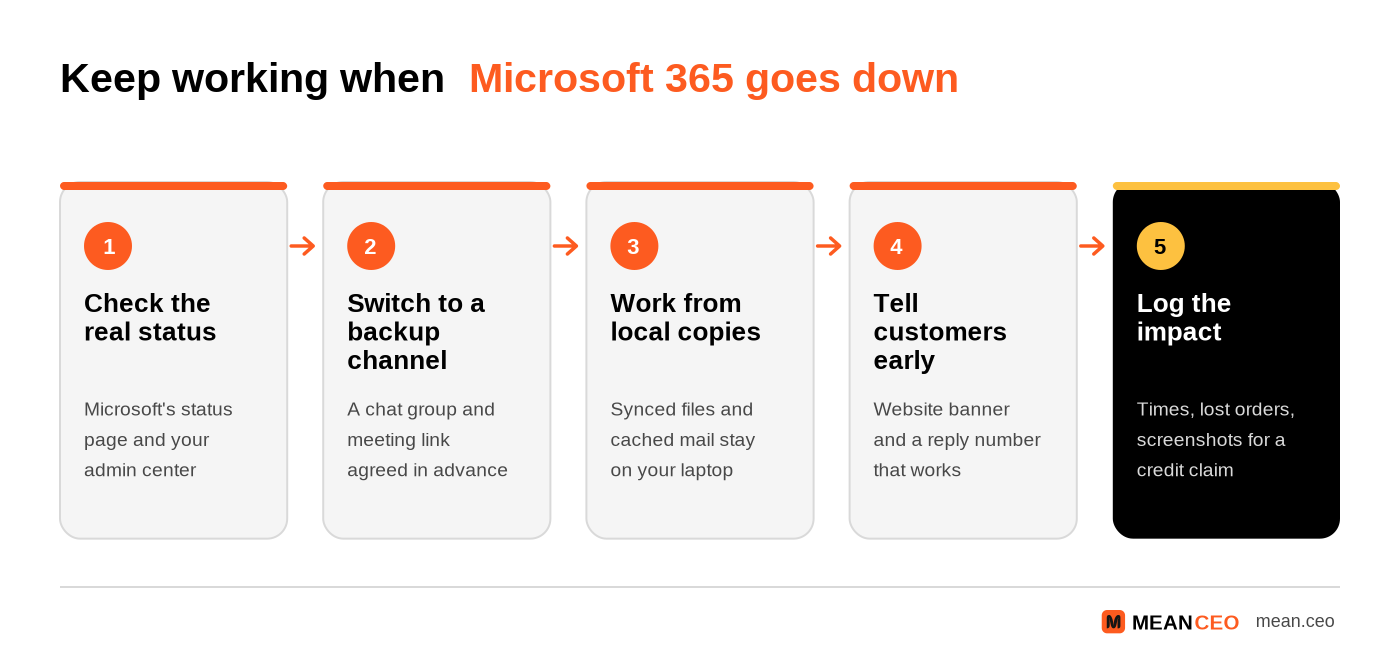
- Check the real status first. Bookmark Microsoft's public status page and, if you're the admin, the Service health page in the Microsoft 365 admin center. Downdetector shows that people are angry; Microsoft's incident text shows what's broken and when the next update comes.
- Agree on a backup channel now. Pick one chat group and one video link outside Microsoft (Google Meet, Zoom, Slack, Signal, whatever your team already has) and write it in your handbook. During this outage, Google's tools kept working.
- Keep your working files offline. Files synced to your laptop with OneDrive and mail cached in Outlook desktop stay readable when the cloud side is down. Check that the files you need for invoices and customer work are set to stay on the device.
- Keep a phone list outside Outlook. If your contacts only live in Exchange, you can't even look up a client's number. A shared sheet or your phone's own contacts solves it.
- Tell customers early. A two-line banner on your website and an auto-reply from another address beat silence. Name who sends it, as in our guide on scaling customer support.
- Watch for fake 'log in again' emails. CNN reported warnings that scammers use outages for phishing. Microsoft didn't ask anyone to re-enter a password to fix this, so any email that does is a trap. Our guide on building security into a startup covers the login side.
- Log the impact for a service credit. Write down when your team lost access, what stopped and what it cost. Business subscriptions come with Microsoft's service level commitments, and the admin has to file the credit claim with evidence. Our sister site Fe/male Switch explains Microsoft 365 outage compensation: who qualifies, the math for 30 hours and the 31 December deadline.
Put Microsoft on the supplier list in your vendor management plan, next to your host, bank and payment provider, with the question you'd ask any supplier: what happens to us if this is down for a day? We track the month's incidents, including the Railway breach report, in our cybersecurity news for November 2026.
Are you getting customers from ChatGPT yet?
More and more traffic is coming from Perplexity, ChatGPT, Grok and other AI tools.
👉 Rank on ChatGPT
What Microsoft hasn't said yet
- How many users and companies were hit. Microsoft gave no number; Downdetector counts are complaints, not users.
- Compensation. Microsoft hasn't announced automatic credits, and the final post-incident report doesn't mention them. Business customers claim under the service level agreement themselves.
- Whether the earlier Teams incident was related. The report doesn't mention the 14:45 Teams incident (TM1550488), though it does describe a separate US East Teams routing problem that pushed Teams traffic onto the Exchange gateway.
FAQ: the Microsoft 365 outage of November 2026
Is Microsoft 365 down right now?
No. Microsoft posted a final update on its status page on 14 November 2026: services fully recovered and the email backlog processed. Check status.cloud.microsoft or the Service health page in your admin center for anything newer.
How long did the Microsoft 365 outage last?
About 24 hours of customer impact, from 16:20 UTC on 12 November to 16:10 UTC on 13 November 2026, according to Microsoft's post-incident report. Its status record first showed about 30 hours, and the incident was declared resolved at 04:15 UTC on 14 November. In Europe, problems started on the evening of Thursday 12 November and lasted through Friday 13 November 2026 for many companies.
What caused the Microsoft 365 outage?
A hidden defect from a Windows update, rolled out since July to Microsoft 365's network gateway servers, made newer servers lock up under peak load. With Teams traffic shifted onto the same gateway and nearly 14% of its capacity offline, the failure cascaded until more than 80% of the servers stopped responding.
Was the Microsoft 365 outage a cyberattack?
No. Microsoft said it found no indication of malicious or cyber activity and called it a technical issue not related to cyber or AI agents.
Did I lose emails during the outage?
Mail sent to you was queued, and Microsoft extended its timeout window to 48 hours so held messages weren't bounced. Check for bounce notices and ask for new copies of expired codes and links.
Will Microsoft compensate businesses for the outage?
Microsoft hasn't announced automatic compensation. Business subscriptions are covered by Microsoft's service level agreement, and your admin has to file a claim for service credits.
About the Author
Violetta Bonenkamp, also known as MeanCEO, is an experienced startup founder with an impressive educational background including an MBA and four other higher education degrees. She has over 20 years of work experience across multiple countries, including 5 years as a solopreneur and serial entrepreneur. Throughout her startup experience she has applied for multiple startup grants at the EU level, in the Netherlands and Malta, and her startups received quite a few of those. She’s been living, studying and working in many countries around the globe and her extensive multicultural experience has influenced her immensely.
