TL;DR: how should a bootstrapped startup manage and escalate support tickets?
Put every request from email, chat and forms into one help desk so each one becomes a ticket with an owner and a status. Give tickets four priorities based on impact and urgency, and promise first-response times you can actually keep. Write down when a ticket moves up: to the person with the right skills (functional escalation) or to the founder (hierarchical escalation), and hand it over with a summary so the customer never repeats themselves. Review breaches and repeat topics every week, and turn the answers into help articles.
💡 Growing fast? Read how to scale customer support from 10 to 1,000 customers.
The first support tickets of a startup usually land in the founder's inbox. Someone writes in, you answer from your phone, and for a while that works. Then a few things slip. A bug report waits four days because it was buried under newsletters. Two people answer the same customer differently. A paying client with a broken integration gets the same treatment as a question about the logo colour.
Support ticket management fixes this with a few simple rules: every request gets an ID, an owner, a priority and a status. Escalation is the part that decides what happens when the first person can't solve it. In this guide I'll show you how to set up statuses, a priority matrix, support tiers, escalation rules and SLAs on a bootstrapped budget, which tools cost what, and which EU rules touch your support inbox.
What is support ticket management?
A support ticket is a record of one customer request: who asked, what they asked, through which channel, and everything that happened since. Ticket management is the process around it: how tickets are created, sorted, assigned, answered, escalated and closed, and how you learn from them afterwards.
The point isn't bureaucracy. A ticket makes a request visible to the whole team, so nothing depends on one person remembering it. It also gives you data: which topics come up most, how long customers wait, and which problems keep coming back.
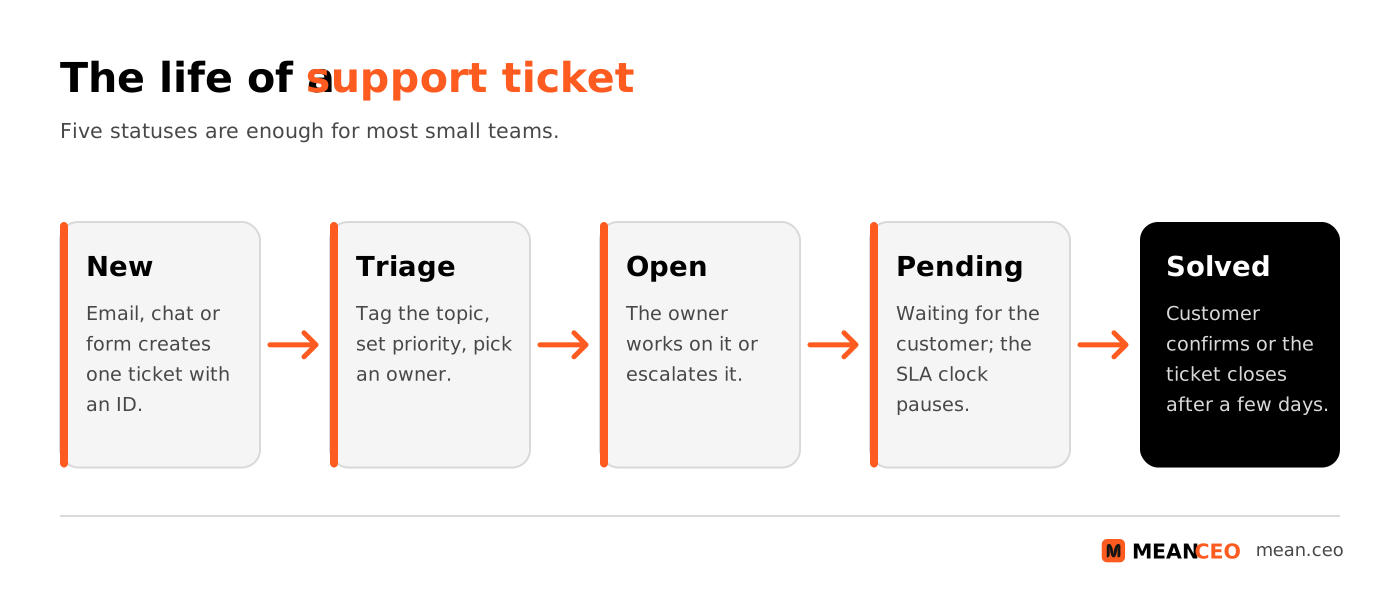
Five statuses are enough
- New: the ticket exists but nobody has looked at it yet. Nothing should stay here for longer than your first-response target.
- Open: someone owns it and is working on it.
- Pending: you asked the customer something and are waiting for the answer. Most help desks pause the customer-facing clock in this status.
- On hold: you are waiting for someone inside the company or a supplier, such as a developer or a payment provider. Use it sparingly; it hides work.
- Solved: you believe the problem is fixed. Let the ticket reopen automatically if the customer replies within a few days.
Add a few tags from day one: topic (billing, bug, how-to, feature request, account), product area and customer plan. You'll need them later to see where tickets come from.
Why ticket handling matters for bootstrapped startups
Customers judge your company by how you treat them when something breaks, and they have little patience left.
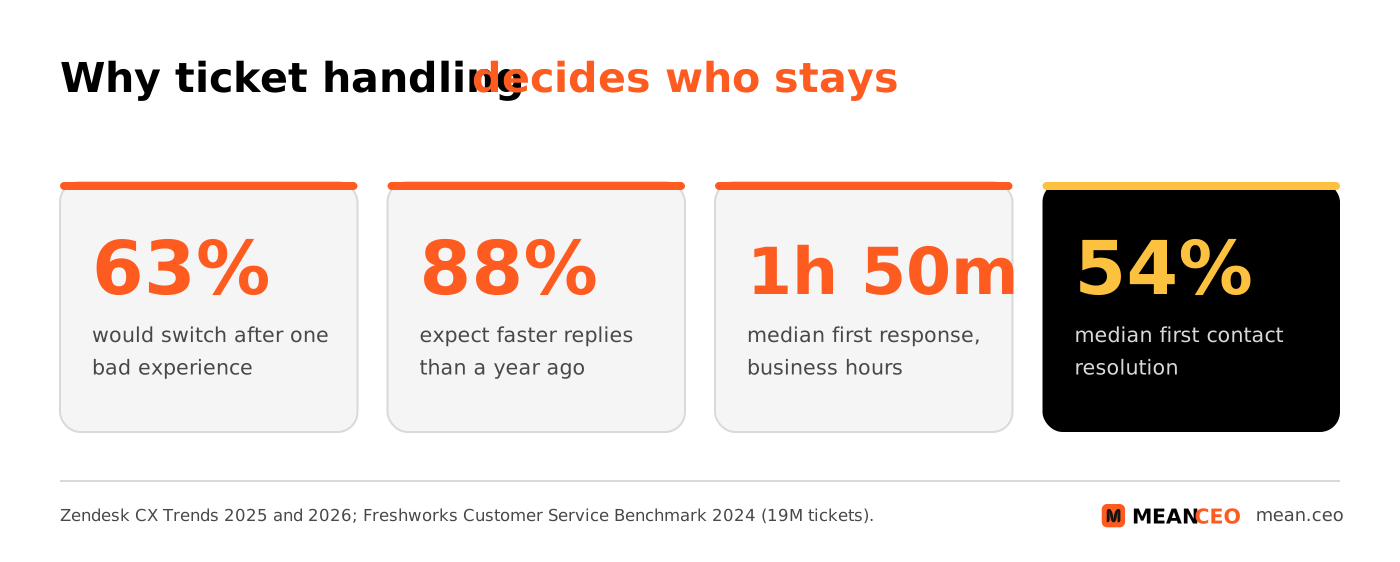
- One bad experience is often enough. In Zendesk's CX Trends 2025 research, based on nearly 5,100 consumers in 22 countries, 63% said they were willing to switch to a competitor after just one bad experience, up 9% on the year before.
- Expectations keep rising. In Zendesk's CX Trends 2026 survey of 6,182 consumers, 88% said they expect faster responses than a year earlier, and 74% expect customer service to be available 24/7.
- Plenty of companies still don't answer. When SuperOffice emailed 1,000 companies with a simple customer service question, 62% never replied, and only 20% answered the question fully in their first reply.
For a bootstrapped company, this is good news. Big competitors are often slow. A three-person team that replies within an hour, with a real answer, stands out. Support is also where churn shows up first: unresolved tickets are one of the signals worth adding to a customer health score.
How to set ticket priorities
Priority decides the order of work and the speed of the first reply. Without it, the loudest customer wins. Most frameworks, including ITIL, base priority on two things: impact (how many customers or how much revenue is affected) and urgency (how fast the damage grows).
Atlassian's help desk, for example, combines four levels of impact with four levels of urgency into one priority, and says your own matrix may differ. A small team needs something simpler: four priorities with an example for each, written so that anyone on the team picks the same one.
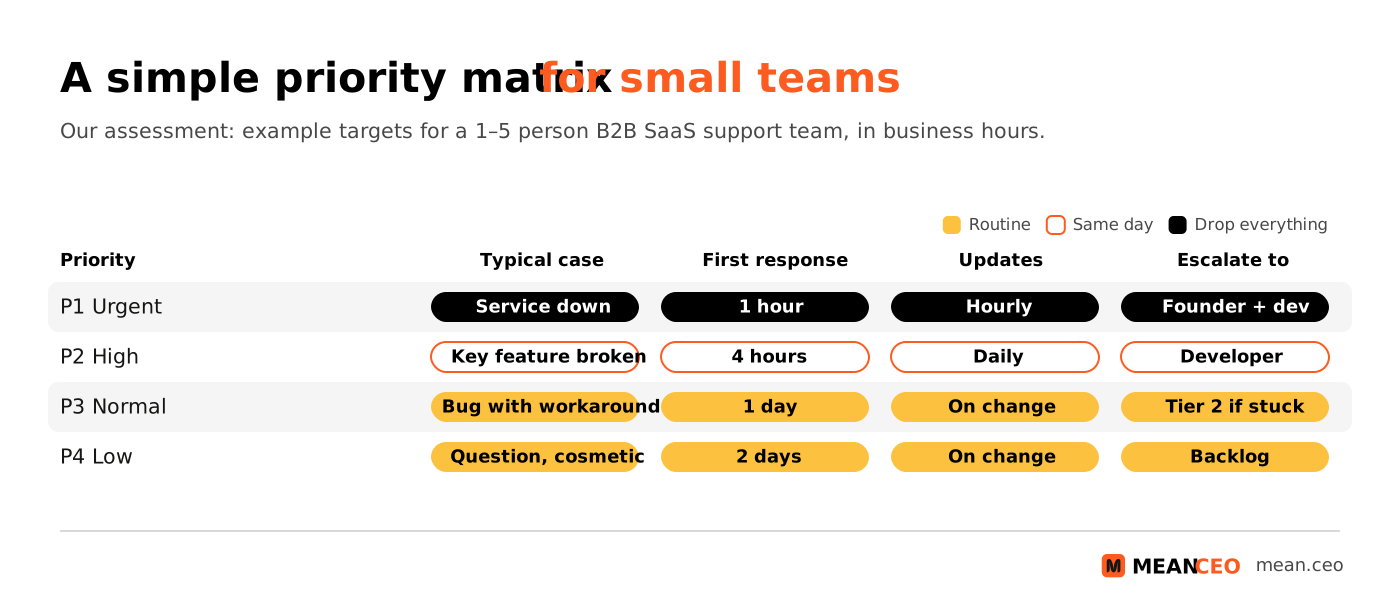
When in doubt, choose the higher priority
Incident teams use a similar scale. PagerDuty's public incident response guide runs from SEV-1, a critical issue that needs executive involvement and public communication, to SEV-5, cosmetic bugs that simply go into the backlog. Its advice for unclear cases is worth copying: if you're unsure which of two levels applies, treat it as the higher one. You can always lower a priority after the first look; you can't win back a customer who waited a day for an outage reply.
Priority is not the customer's plan
It's tempting to make every enterprise ticket P1. Keep the two separate: priority describes the problem, and your plan or contract describes the response time you promised. A help desk can combine both, for example a P2 from a customer on a premium plan gets a shorter SLA than a P2 from a free user.
Support tiers for a small team
Tiered support means simple questions are handled by the first person who sees them, and harder ones move to people with more skills or more time. The labels Tier 0 to Tier 3 are an industry convention, not a formal standard, but they help a small team agree who does what.
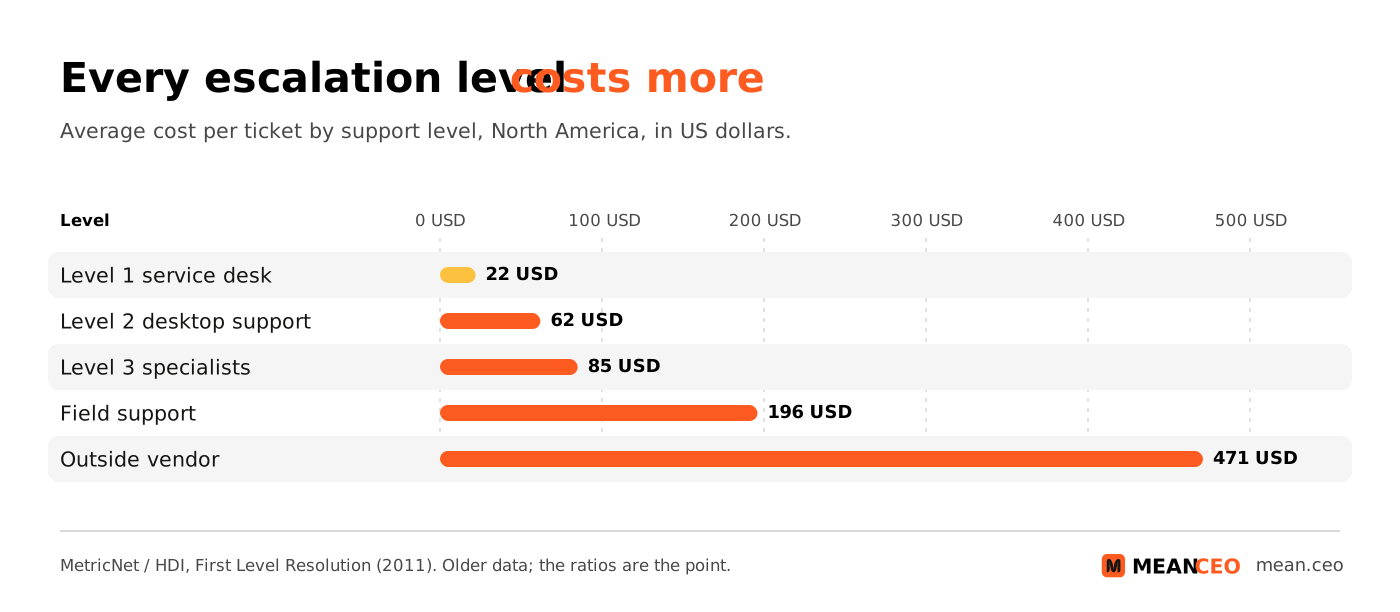
Every step up the ladder costs more. In MetricNet and HDI research on North American support teams, an average ticket cost $22 at the service desk, $62 at desktop support, $85 at level 3, $196 for field support and $471 when it went to an outside vendor. The numbers are old and American, but the ratio holds for any team: a developer's hour spent on a how-to question is the most expensive hour in your company.
Many escalations are avoidable. In a 2018 column for HDI, MetricNet's Jeff Rumburg reported that on average 17.8% of tickets closed by desktop support could have been solved at level 1, with a range from 2.7% to 35.1% between companies. The fix is rarely a better person at level 2. It's better documentation at level 1, which is why a shared AI-powered knowledge base pays off early.
Functional vs hierarchical escalation
There are two ways to escalate a ticket, and most teams mix them up. Atlassian describes functional escalation as passing an issue to whoever is best equipped to solve it based on skills or systems knowledge, not seniority. Hierarchical escalation moves it up by experience level or seniority, usually to a manager or the founder.
A good rule: escalate functionally to solve the problem, and hierarchically to make a decision. A founder who jumps into every technical ticket slows the developer down; a developer who decides on refunds creates a policy nobody agreed to.
Write your escalation triggers down
Escalation shouldn't depend on someone's mood. Agree on triggers and put them in your help desk as automations where you can:
- Time: a P1 without a first reply after 30 minutes, or any ticket close to breaching its SLA.
- Scope: the same problem reported by three or more customers within an hour usually means an incident, not a ticket.
- Skill: the fix needs code, database access or a supplier.
- Money and risk: refund requests above a set amount, a cancellation threat from a key account, anything about a data breach, a legal letter or a GDPR request.
- Ping-pong: more than three replies back and forth without progress. Call the customer instead.
Hand over without making the customer repeat themselves
The worst part of escalation for a customer is explaining the problem again. Every escalated ticket should carry an internal note with five lines: what the customer wants, what has been tried, how to reproduce it, how urgent it is for them, and what you promised them and by when. Then tell the customer who has the ticket now and when they'll hear back. A short "I've passed this to Marta, our integrations developer, and you'll have an update by 3 pm" keeps trust intact.
SLAs: promise only what you can keep
A service level agreement (SLA) is your promise to customers about response and resolution times. Teams also use internal targets, called operational level agreements (OLAs) in ITIL, such as "engineering replies to escalated P2 tickets within four business hours". The customer only sees the SLA, but the SLA fails when the OLA behind it does.
Help desks measure SLAs in a few different ways, so set them up deliberately. Zendesk's documentation on SLA policies is a good reference even if you use another tool:
- First reply time runs from the moment the ticket is created to the first public reply from an agent. An automatic "we got your email" message doesn't count.
- Business hours or calendar hours can be chosen per priority. A small team usually promises business hours for everything except P1.
- Pausing: requester wait time pauses while a ticket is Pending, agent work time also pauses On hold, and total resolution time never pauses.
How fast is fast enough? The Freshworks Customer Service Benchmark Report 2024, based on 19 million tickets from more than 17,000 accounts, gives a useful reference in business hours:
Sources: Freshworks Customer Service Benchmark Report 2024 (January 2023 to April 2024, business hours). Times rounded to the nearest minute.
For a bootstrapped team, beating the median on first response is realistic; beating it on resolution time depends on your product. Track SLA breaches alongside your retention metrics: if accounts with breached tickets churn more, you've found where to invest.
Tiers or swarming?
Tiered escalation isn't the only model. The Consortium for Service Innovation, the non-profit behind Knowledge-Centered Service (KCS), promotes Intelligent Swarming: instead of passing a ticket up a ladder, the first person pulls in whoever can help, and the original owner stays with the customer.
Its argument is clear: a tiered model is efficient if 95% or more of issues are simple and known; beyond that, it adds transfers of work and slows down the flow of knowledge. In a startup of three to ten people, you probably swarm already, in a Slack channel. Make it explicit: a #support-help channel, a rule that the person who asks keeps the ticket, and a habit of turning every answer into a help article.
Consortium members also report results from KCS, such as 50–60% faster resolution and 30–50% higher first contact resolution. These are self-reported figures, not a controlled study, but the idea behind them is simple: capture the answer while you solve the ticket, and the next person won't need to escalate. Teaching customers directly helps too; see customer education and training programs.
Are you getting customers from ChatGPT yet?
More and more traffic is coming from Perplexity, ChatGPT, Grok and other AI tools.
👉 Rank on ChatGPT
Where AI fits in ticket management
AI is now part of every help desk, and it changes escalation more than it changes answering. Use it in three places:
- Triage: suggesting tags, priority, language and the right owner. This saves time on every ticket and is low risk because a human still decides.
- Tier 0 answers: a bot that answers from your help centre. Vendors report high resolution rates for their own AI agents, but those numbers are self-reported and depend on how good your documentation is.
- Summaries for handovers: an AI summary of a long thread is a good start for the escalation note, as long as the person escalating checks it.
Be careful with the hype. Gartner predicted in March 2025 that by 2029 agentic AI will resolve 80% of common customer service issues without human help. A Gartner survey of 5,728 customers, however, found that 64% would prefer companies didn't use AI for customer service. Klarna said in February 2024 that its AI assistant handled two-thirds of its customer service chats in its first month; in May 2025 its CEO told Bloomberg that the focus on cost had led to lower quality, and the company started hiring human agents again.
The lesson for escalation: every bot needs a clear, quick way to reach a person, and the bot's conversation must travel with the ticket. Since 2 August 2026, Article 50 of the EU AI Act also requires that people are told they are talking to an AI system unless it's obvious. For a step-by-step setup, see how to use ChatGPT for customer support automation.
Help desk tools and costs
You don't need an enterprise platform. You need one shared inbox that creates tickets, statuses, priorities, SLA timers and simple automations. Here are public prices per agent per month, billed annually, as listed in October 2026:
Prices change often and some plans exclude SLA policies or automations, so check the plan before you commit. My rule of thumb: start with a free or cheap tool that has SLA timers and a public help centre, and choose an EU-hosted option if your customers ask about data location. For the rest of your stack, see the essential startup tool stack.
EU rules that touch your support inbox
Support tickets contain personal data and sometimes legal requests. Four sets of rules matter for European startups:
- GDPR requests arrive as tickets. When a customer asks for a copy of their data or for deletion, Article 12(3) gives you one month to respond, extendable by two further months for complex requests if you tell the person within the first month. Tag these tickets and escalate them to whoever owns data protection on day one. Our GDPR compliance guide for early-stage startups covers the basics.
- Data minimisation in tickets. Don't ask customers to send passwords, full card numbers or ID scans by email, and set a retention period for closed tickets.
- AI chatbots must say they are AI. Article 50 of the AI Act has applied since 2 August 2026.
- Accessibility. The European Accessibility Act (Directive 2019/882) has applied since 28 June 2025. It covers e-commerce services for consumers, and its annex mentions support services such as help desks and call centres, which must give information on accessibility in accessible ways. Microenterprises providing services, with fewer than 10 people and turnover or balance sheet of up to €2 million, are exempt. Pure B2B software is likely outside its scope.
- Consumer complaints. If you sell to consumers, the Consumer Rights Directive requires you to share your complaint-handling policy before the sale, and a phone line about an existing contract can't cost more than the basic rate.
This is general information, not legal advice.
How to set up ticket management and escalation in 6 steps
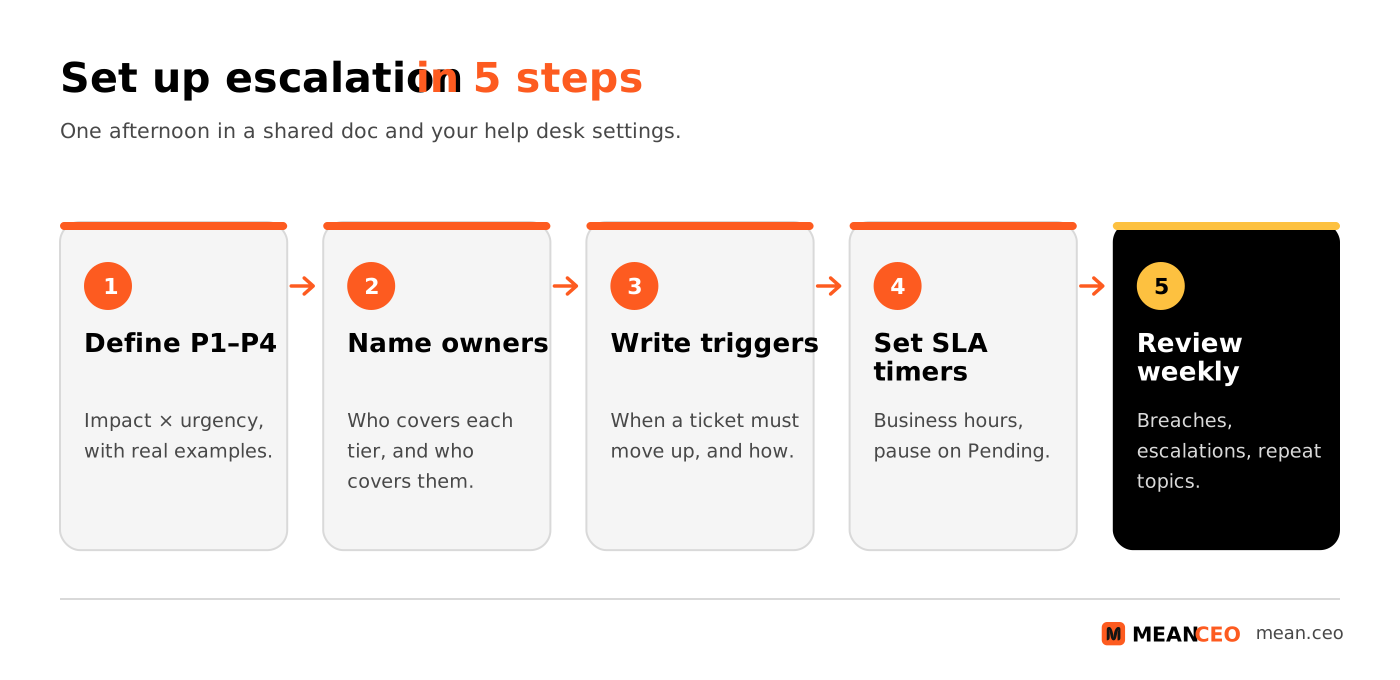
- Move every channel into one help desk. Forward your support email, connect chat and forms, and stop answering support questions from personal inboxes or DMs.
- Define statuses, tags and four priorities. Write one real example for each priority from your own past tickets.
- Name owners for each tier, including a backup. In a small team, rotate the tier 1 duty daily or weekly so one person isn't interrupted all the time.
- Write escalation triggers and a handover template. Put the five-line handover note into a macro or snippet.
- Set SLA targets you can keep, then automate reminders. Start a little slower than you think you can manage; it's better to beat a promise than to break it.
- Review every week. Look at breached SLAs, escalated tickets and the top five topics. Turn repeat questions into help articles and repeat bugs into fixes. Simple automation workflows can collect these numbers for you.
Common mistakes
- Everything is urgent. If half your tickets are P1, your priorities mean nothing. Revisit the examples.
- Escalating instead of documenting. If the same question reaches a developer twice, the problem is a missing help article.
- Escalation as a black hole. The customer hears nothing for days after the ticket moves. The original owner should keep the customer updated.
- SLAs nobody measures. A promise on the website without a timer in the help desk will be broken quietly.
- Bots without an exit. Customers who can't reach a human escalate themselves, publicly.
- Closing tickets too fast. "Solved" should mean the customer's problem is gone, not that you replied. After a frustrating case, a short personal follow-up helps; if the customer leaves anyway, see win-back campaigns for churned customers.
Conclusion: clear rules beat heroics
Good support in a small startup doesn't come from a founder answering emails at midnight. It comes from a few clear rules: one inbox, every request a ticket, four priorities with examples, written escalation triggers, a handover note and SLAs you can keep. Add a weekly review, and every escalated ticket makes your product and documentation better. That's how a three-person team gives faster, better answers than companies a hundred times its size.
FAQ: support ticket management and escalation
What is support ticket management?
The process of recording every customer request as a ticket with an ID, owner, priority and status, and handling it until it's solved, so nothing gets lost and you can measure response times and common problems.
What is ticket escalation?
Moving a ticket to someone who can solve it (functional escalation) or to someone who needs to decide or be informed, such as a manager or the founder (hierarchical escalation).
What is the difference between functional and hierarchical escalation?
Functional escalation goes to the person with the right skills or system access, regardless of seniority. Hierarchical escalation goes up by seniority, for decisions about refunds, key accounts or risk.
How do you prioritise support tickets?
Combine impact (how many customers or how much revenue is affected) with urgency (how fast it gets worse). Four levels, P1 to P4, each with a real example, work for most small teams.
What is a good first response time?
In the Freshworks 2024 benchmark of 19 million tickets, the median first response was about 1 hour 50 minutes in business hours, and the top 20% replied within about 39 minutes.
What are support tiers?
Levels of support: tier 0 is self-service, tier 1 handles common questions, tier 2 handles complex or technical issues, and tier 3 is engineering. The labels are a convention, not a formal standard.
When should a ticket be escalated?
When it's close to breaching its SLA, needs skills or access the current owner doesn't have, affects many customers, involves money, legal, security or GDPR issues, or has gone back and forth without progress.
Do I need a help desk tool as a small startup?
Yes, once more than one person answers customers or you get more than a handful of requests a day. Free and low-cost options such as Zammad, FreeScout, Crisp, Zoho Desk or Help Scout are enough to start.
Can I use an AI chatbot for first-line support in the EU?
Yes, but under Article 50 of the EU AI Act, people must be told they are interacting with an AI system unless it's obvious, and you should always offer a quick way to reach a human.
About the Author
Violetta Bonenkamp, also known as MeanCEO, is an experienced startup founder with an impressive educational background including an MBA and four other higher education degrees. She has over 20 years of work experience across multiple countries, including 5 years as a solopreneur and serial entrepreneur. Throughout her startup experience she has applied for multiple startup grants at the EU level, in the Netherlands and Malta, and her startups received quite a few of those. She’s been living, studying and working in many countries around the globe and her extensive multicultural experience has influenced her immensely.
