TL;DR: Video Content for CEO Personal Brands: Beginner's Guide
Video lets people see and hear the person behind a startup before they ever book a call. You don’t need a studio: a phone, window light, a cheap clip-on mic and captions are enough. Pick one goal, one main platform (LinkedIn for B2B, YouTube for search, Shorts or Reels for reach), record a short video a week in one batch, and reuse every recording as clips and posts. Measure replies, profile visits and inbound requests, not just views.
💡 Want the bigger picture first? Explore CEO Personal Branding Strategies, written for founders who want visibility without a marketing team.
Video Content for CEO Personal Brands: Beginner's Guide
Video content has become hard to ignore for CEOs who want to build a personal brand. Whether you’re leading a large company or bootstrapping a startup from a small town in Europe, video lets people judge your expertise, your tone and your trustworthiness in a few minutes. Buyers expect it, too: in Wyzowl’s State of Video Marketing 2026 survey, 63% of consumers said a short video is how they would most like to learn about a product, and 91% of businesses said they use video in their marketing.
But here’s the kicker: creating video content as a CEO isn’t about jumping on trends or making overly polished ads. It’s about authenticity, consistent storytelling, and using your platform to communicate leadership, trust, and vision. For a bootstrapped female entrepreneur like me, Violetta Bonenkamp, video is a way to show your personality and expertise without spending heavily on marketing.
“Authenticity on video captures attention and builds trust. In Europe, where startups navigate cultural and funding barriers, CEOs who lead with transparency gain an edge.”
In this beginner's guide, I'll walk you through the “why” and the “how”: goals, platforms and their real limits, a one-hour weekly routine, the tools and what they cost, the mistakes to avoid and how to measure results. Everything is aimed at low-budget, first-time founders, particularly in Europe.
Want to schedule videos like a pro?
A content calendar ensures you publish consistently without scrambling for ideas at the last minute.
👉 Learn how to create a CEO content calendar
Why Is Video Content Crucial for CEOs?
Video stands out because it combines voice, face and body language, which text can’t carry. For CEOs selling across Europe, where every market has its own language and business habits, a short video lets a prospect or partner get a feel for you before the first meeting.
- Humanizes your brand: People do business with people, not companies. Sharing your story or a behind-the-scenes look builds relatability.
- Scalable trust-building: One video answers the same question for hundreds of people, without one-on-one calls.
- Warms up decision-makers: Many European buyers still prefer to meet before they buy. A video they watched last week makes that first meeting warmer and shorter.
- Rides a growing format: LinkedIn said in February 2025 that video uploads were up 36% year on year and it has been testing a full-screen vertical video feed. More competition, yes, but also an audience that now expects video from business leaders.
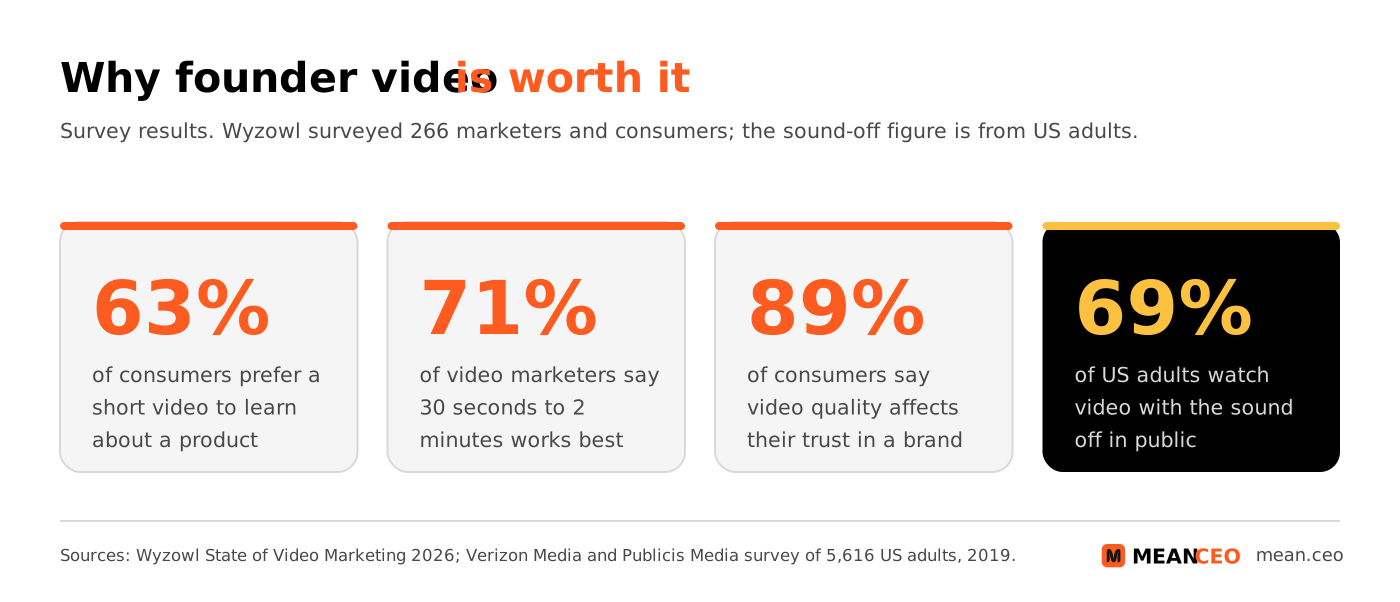
Treat these as signals, not laws: Wyzowl’s 2026 edition is based on 266 respondents, and the sound-off figure comes from a 2019 survey of US adults. They still point the same way: short, clear, captioned video wins.
Step-by-Step Guide to Creating CEO Video Content
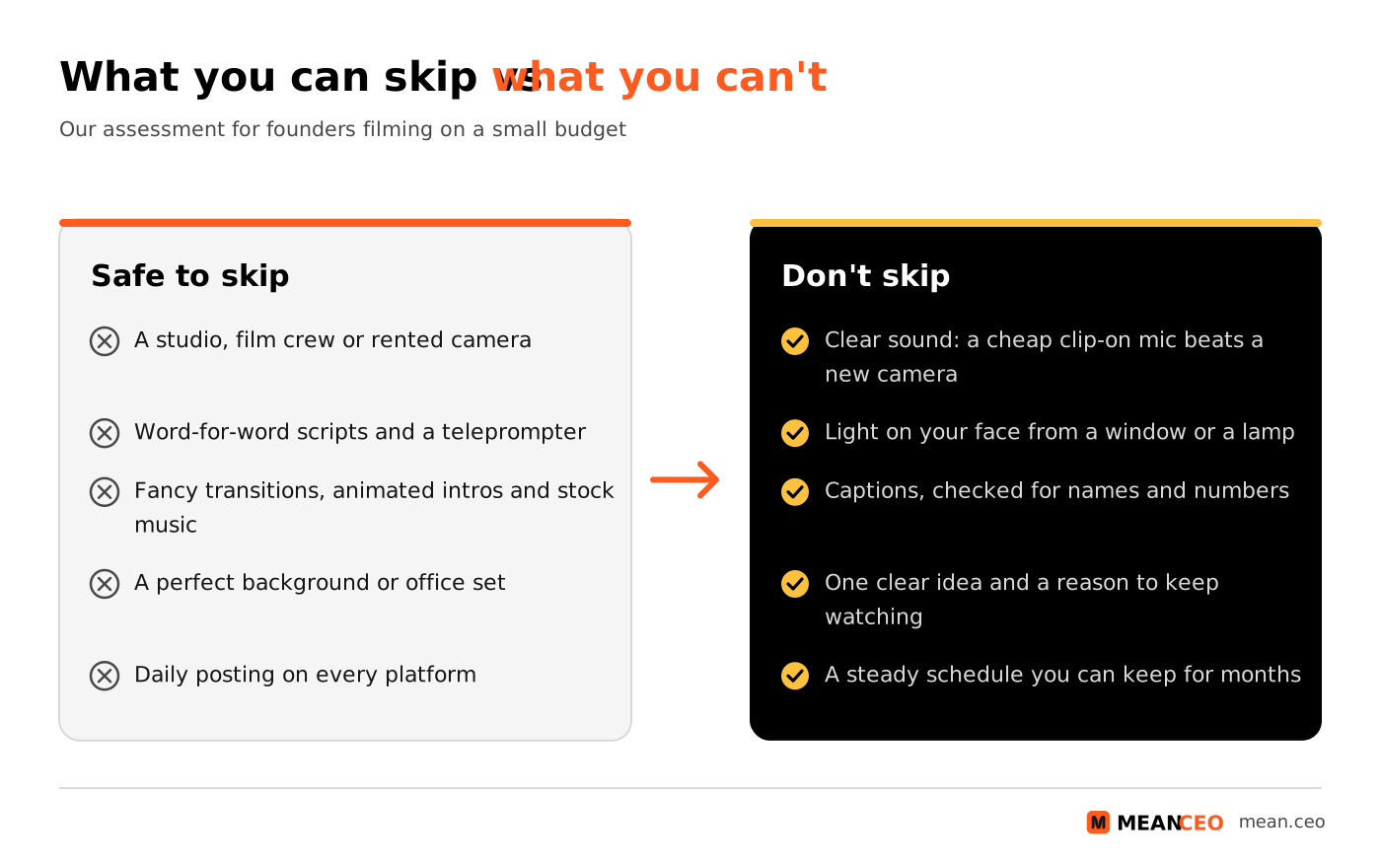
Videos don’t need to be produced in a studio with a Hollywood budget, especially for CEOs bootstrapping their startups. Clear sound, good light and a real point matter more than expensive kit. Here's how you can approach video efficiently and effectively:
1. Define Your Video Goals
- Establish credibility: Highlight your expertise in your domain by sharing educational or thought leadership content.
- Engage with audiences: Answer FAQs, share business updates, or celebrate milestones to foster community connections.
- Ultimate CTA: Guide potential collaborators, investors, or customers on next steps with clear calls to action.
Pick one main goal for the next three months. It decides the video type, the platform and what you measure:
Our assessment, for founders with no video team. If your audience is on one platform already, start there, even if it isn’t on this list.
2. Select Platforms Strategically
Choosing the right platform matters more than posting everywhere. Here are my recommendations for 2026:
- LinkedIn: The natural home for professional storytelling and reaching decision-makers.
- YouTube: Perfect for longer thought leadership pieces and a searchable video library that keeps bringing views for years.
- Instagram: Reels are bite-sized and suit founders with a consumer or niche audience.
- X (formerly Twitter): Short video snippets as teasers can send your community to longer content elsewhere.
Each platform has hard limits. They are maximums, not targets, so check them before you plan a video:
Sources: LinkedIn, YouTube and X help centres; Instagram and TikTok announcements as reported by the tech press. Limits change, so check the LinkedIn video specs and YouTube Shorts rules before a big shoot.
3. Craft a Simple Production Workflow
- Start with script-writing: Jot down bullet points instead of overwhelming yourself with word-for-word scripts.
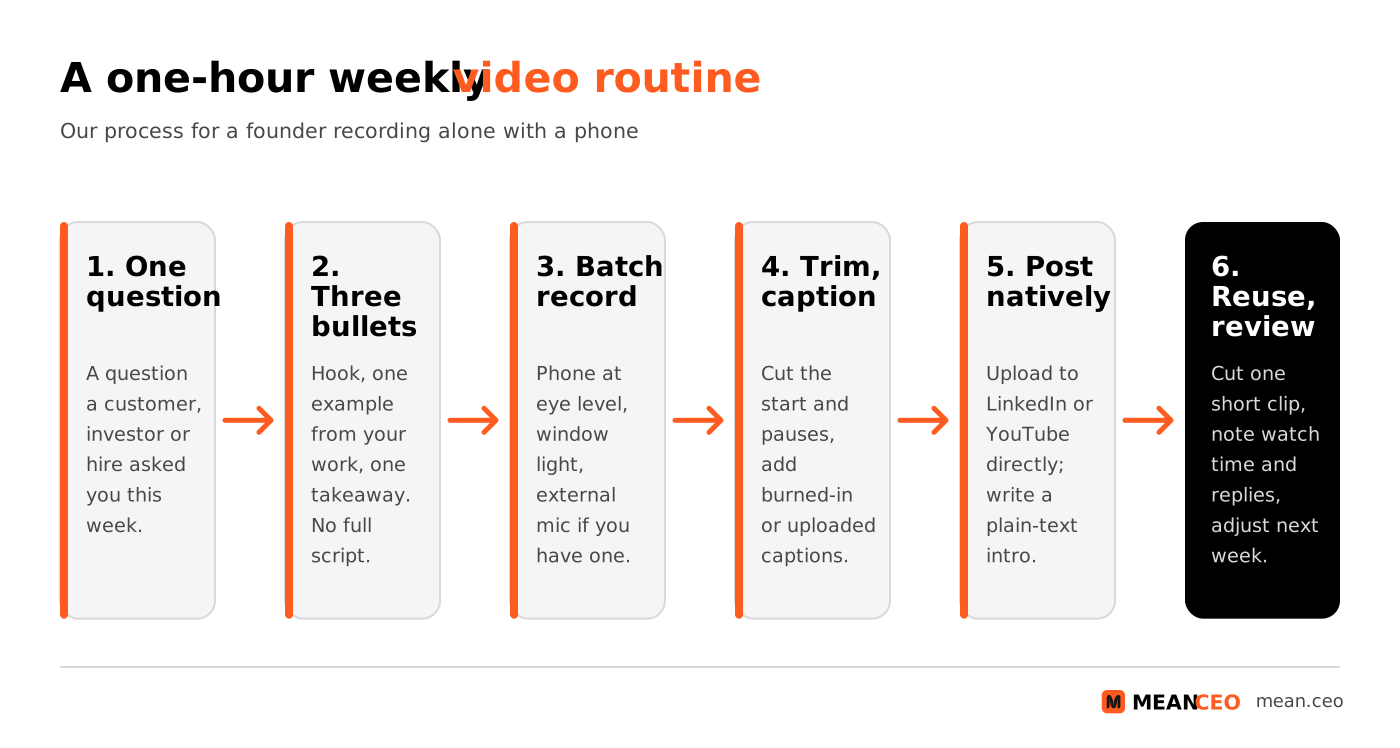
- Batch recording: Record videos for the week or month in one session to save time.
- DIY editing: Use accessible tools like Descript, CapCut or Canva. AI tools such as Pictory can turn a blog post or long recording into a first cut, which you then fix by hand.
- Repurpose content: Segment videos into tailored clips for different platforms. Discover strategies with repurposing CEO content.
4. Choose Tools That Fit Your Budget
You can start for €0. Most tools below have a free plan that is enough for your first months; pay only when a missing feature slows you down every week.
Prices from the vendors’ pricing pages in November 2026, shown in the currency each page displays in Europe; they change often. For more on AI editors, see our overview of how AI is changing video editing.
5. Get Light, Sound and Captions Right
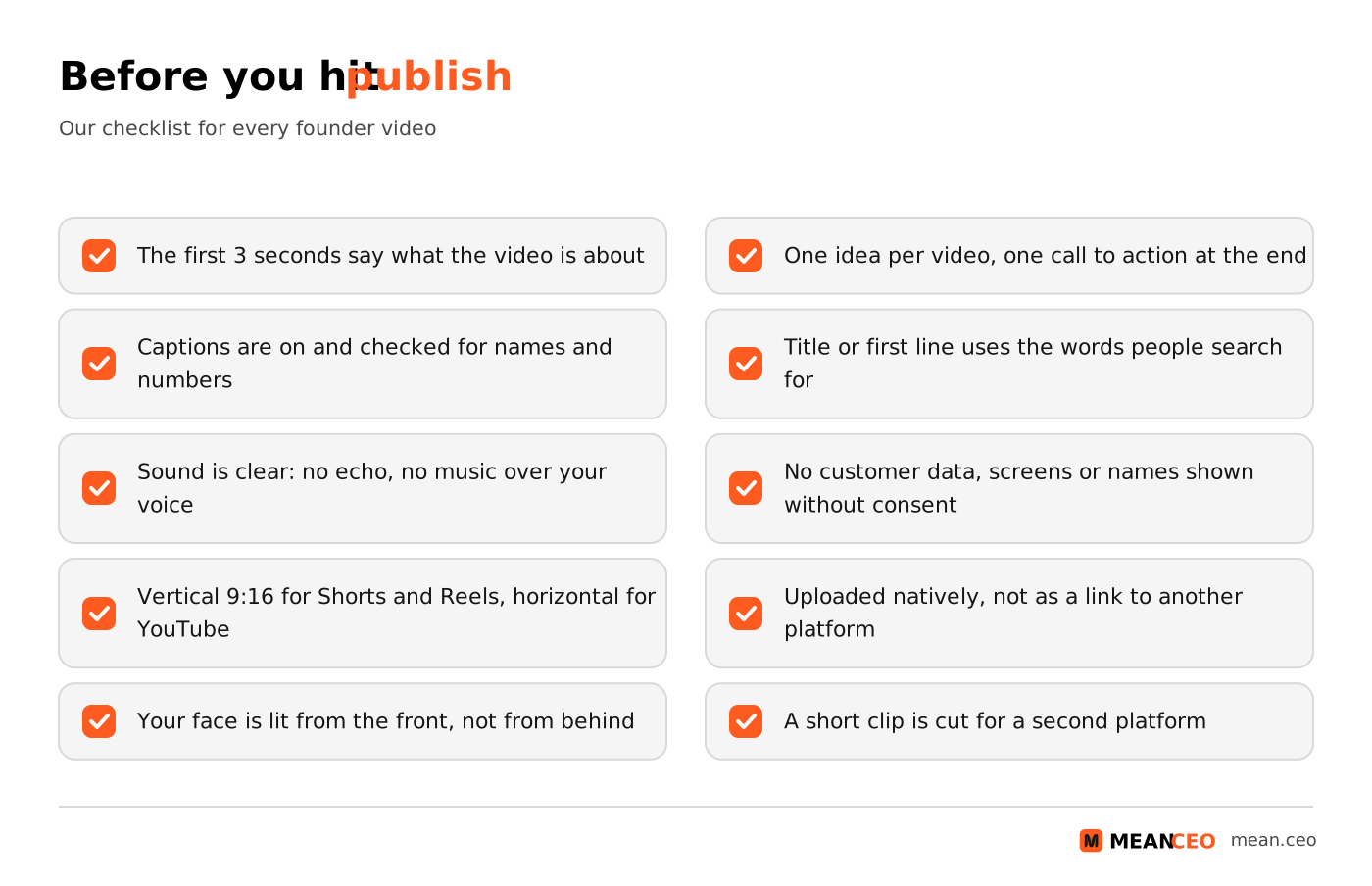
Viewers forgive a plain background; they don’t forgive bad sound. Put a cheap clip-on microphone on before you upgrade anything else, sit facing a window, and record somewhere without echo.
Then add captions to every video. In a 2019 survey of 5,616 US adults by Verizon Media and Publicis Media, 69% said they watch video with the sound off in public, 25% even in private, and 80% of the people who use captions said they don’t have a hearing impairment. Most editors above create captions automatically; check names, numbers and your company name by hand before you publish. If you sell in several European countries, subtitles in the buyer’s language are a cheap way to show you take that market seriously.
What Should a CEO Talk About on Video?
The best topics come from your inbox. Every question a customer, investor or new hire asks you is a video someone else wants too. Start with these:
Speaking on stage gives you some of your best footage; our guide to speaking engagements for female founders shows how to get invited.
Are you getting customers from ChatGPT yet?
More and more traffic is coming from Perplexity, ChatGPT, Grok and other AI tools.
👉 Rank on ChatGPT
Biggest Mistakes CEO Founders Make on Video
Stepping into video as a first-timer isn’t without pitfalls. Some common mistakes include:
- Overproducing: Don't aim for cinematic perfection. In 2020 Facebook’s creative team reported that mobile-shot Stories ads outperformed studio-shot ones in a small study of 30 ads it commissioned. But “authentic” doesn’t mean sloppy: in Wyzowl’s 2026 survey, 89% of consumers said video quality affects their trust in a brand, so fix sound and light first.
- Skipping subtitles: Many people watch with the sound off in public, so a video without captions loses them in the first seconds.
- Lack of consistency: Sporadic uploading erodes audience recall. A weekly or fortnightly video you can keep up beats a burst of daily posts that stops after a month.
- Ignoring mobile: Much social video is watched on phones, and Shorts and Reels are vertical. Frame yourself so the video still works in 9:16.
- Posting links instead of videos: Upload the file to each platform natively instead of sharing a YouTube link on LinkedIn, so it plays in the feed.
- Filming people without asking: If a customer or employee can be recognised, the GDPR treats that footage as personal data. Ask for written permission first, and blur screens that show customer details.
How to Measure Whether Your Videos Work
Views are the easiest number to see and the least useful on their own. Look at whether people watched, and whether they did something next:
Give each format at least 8–10 videos before you judge it; one video tells you very little. Our guide to personal branding ROI shows how to connect founder visibility to sales.
Win over professional audiences with visuals
Headshots for CEOs build trust faster than words.
👉 Check out CEO photography tips
Conclusion: The Path to CEO Video Mastery
Video is one of the most efficient ways to put your voice and face in front of the people you want to work with. By starting small, sharpening your storytelling, captioning everything and staying consistent, even bootstrapped entrepreneurs can build a credible leadership presence online. Send every video somewhere useful: your personal website as a startup CEO is a good home for your best ones.
If you found this guide actionable, you’ll love exploring related ways to build authority. Learn how founder visibility turns into customers in how CEO personal branding drives bootstrapped customer acquisition, and go deeper with our CEO personal branding strategies for first-time founders and transitioning leaders.
People Also Ask:
What are the 5 C's of personal branding?
There is no single official list. One common version names Consistency, Creativity, Clarity, Commitment and Consultation: a uniform message, a creative way to show what makes you different, a clear purpose, the commitment to keep going, and feedback from people you trust. Other authors use different C’s (such as Content, Credibility or Connection); the point of all of them is a clear, consistent, credible presence.
What is the 3 7 27 rule of branding?
It’s a marketing rule of thumb, not a research finding: the idea that people need about 3 exposures to notice a brand, 7 to remember it and 27 before they trust it enough to act. Nobody has traced it to a study, and similar “rules” such as the Rule of 7 have the same blog-only history. Advertising researchers have long argued about how many exposures are needed (Herbert Krugman’s “three exposures” idea is the best known), and the honest answer is that it depends. The useful lesson is simple: people need to see you many times, so publish consistently.
How to create video content for your brand?
Start with your audience and one goal. Write down the questions they ask, then answer one per video in 1–2 minutes. Record on your phone with good light and a clip-on mic, edit in a free tool such as CapCut, Canva or the YouTube Studio editor, add captions and your logo, and publish natively on the platform where your audience is most active.
What are the 7 pillars of personal branding?
Again, there’s no standard list. A common version names Authenticity, Purpose, Consistency, Visibility, Association, Differentiation and Endurance: being true to yourself, knowing your mission, showing the same values everywhere, being seen, being connected with the right people, standing out, and staying relevant over time. Use it as a checklist, not a formula.
Why is video content essential for building a CEO's personal brand?
Video content allows CEOs to connect authentically with their audience, showcasing their vision and leadership style. Videos humanize leaders, providing an opportunity to build trust and deliver compelling narratives while amplifying their message to a broader audience.
How can CEOs measure the success of their video content efforts?
CEOs can measure the success of their video content by tracking metrics such as engagement rates, views, shares, and comments. Survey feedback and increased brand inquiries are also effective indicators of content resonance and alignment with audience needs.
What are some effective video topics for personal branding in 2026?
Effective video topics include industry insights, behind-the-scenes stories, thought leadership on global challenges, and personal success or learning journeys. Sharing daily workflows or future company visions engages audiences by blending inspiration with authenticity.
What tools can help beginners create impactful video content?
Beginners can record on a phone and edit with free tools: CapCut for vertical clips and auto captions, Canva or Adobe Express for templates (Adobe Express used to be called Adobe Spark), the YouTube Studio editor for basic trims, and OBS Studio or Loom for screen recordings. Pexels and Unsplash offer free stock footage and photos. See the tools table above for paid plans.
How do you ensure accessibility in video content?
Add accurate captions, speak clearly with good audio, avoid fast flashing transitions and cluttered visuals, and describe on screen anything important you show. Use plain language and check how the video looks on a phone. The European Accessibility Act, which applies from 28 June 2025, covers a closed list of products and services (such as e-commerce and banking) and exempts microenterprises with fewer than 10 staff and no more than €2 million turnover from its service rules. Our reading is that it doesn’t require captions on a small company’s social videos, but captions are good practice anyway.
What is the future of video content for personal branding?
Expect more short vertical video on business platforms, more AI help with editing, captions and translation, and more competition for attention. In Wyzowl’s 2026 survey, 63% of video marketers said they had used AI to make videos. Founders who keep a real voice and a recognisable face will stand out as AI-made content grows.
FAQ: Beginner's Guide to CEO Video Content Strategy
How can CEOs make their videos more engaging without high production costs?
Focus on a strong first few seconds, one clear idea and a personal story or example. Add captions and use free or low-cost tools like Canva, CapCut or Descript to trim pauses. Good sound and light matter more than an expensive camera.
What trends in 2026 will impact CEO video storytelling?
Vertical formats, short-form storytelling and AI-assisted editing shape CEO video in 2026, and LinkedIn has been testing a full-screen vertical video feed. Topical videos that react to news in your industry also travel well. See our roundup of YouTube video trends from April 2026.
How often should a CEO publish video content?
Consistency matters more than volume. One video per week is a realistic target for most founders; one every two weeks is fine if that’s what you can keep up. Use a weekly content calendar to plan topics and batch your recording.
Which key SEO strategies can amplify the reach of CEO video content?
Focus on semantic SEO, using relevant keywords in titles and descriptions, optimizing metadata, and including dynamic transcripts. Dive deeper into effective semantic search strategies for video content in 2026.
What is the ideal video length for different platforms?
There’s no single ideal. In Wyzowl’s 2026 survey, 71% of video marketers said 30 seconds to 2 minutes works best. As a starting point, keep LinkedIn videos to 1–2 minutes, Shorts and Reels under 60 seconds, and YouTube how-to videos as long as the topic needs (on YouTube, 8 minutes is the length where mid-roll ads become possible, not a quality rule). Watch your retention data and adjust.
Should CEOs use AI tools to streamline video production?
Yes, for the boring parts. Descript, CapCut and Pictory can cut pauses, create captions and turn long recordings into short drafts, and 63% of video marketers in Wyzowl’s 2026 survey said they had used AI to make videos. Keep your own face and voice at the centre, and check every AI caption and summary before you publish. Our comparison of AI caption tools covers the options.
How do subtitles benefit CEO video content?
Subtitles make your videos accessible and keep the many viewers who watch without sound, which is common in public places. In the 2019 Verizon Media and Publicis Media survey, 80% of caption users said they weren’t hearing impaired: captions are for everyone. They also let you reach buyers in other European languages.
How can CEOs use videos to establish thought leadership?
Share industry insights, innovative solutions, or common challenges faced by your sector. Personal anecdotes and actionable advice foster relatability and authority, reinforcing your position as a trusted industry leader.
What metrics should CEOs track to evaluate video performance?
Focus on engagement metrics: watch time, viewer retention, and interaction rates (likes, shares, comments). Platform-specific analytics, like LinkedIn’s video stats, offer insights into your target audience’s preferences.
Can repurposing video content help maximize efforts?
Absolutely. Cut long videos into short clips for Shorts, Reels or LinkedIn, turn soundbites into audiograms, and turn the transcript into a blog post or a LinkedIn post. This multiplies reach while reducing creation effort.
About the Author
Violetta Bonenkamp, also known as MeanCEO, is an experienced startup founder with an impressive educational background including an MBA and four other higher education degrees. She has over 20 years of work experience across multiple countries, including 5 years as a solopreneur and serial entrepreneur. Throughout her startup experience she has applied for multiple startup grants at the EU level, in the Netherlands and Malta, and her startups received quite a few of those. She’s been living, studying and working in many countries around the globe and her extensive multicultural experience has influenced her immensely.
